So maybe you experience that opening a Word document takes FOREVER?This could be a document from a coworker or an old document from wayback when..See the thing is that Word documents may be referring to an old office template that no longer exists, this mean that every time you open the document it will attempt to open a template file that no longer exist – Word, Excel etc. may now take several minutes to figure this out – and meanwhile you will be starring at a logo just waiting and hoping..So my thoughts were that there must be some setting in office that could bypass this, I managed to find several posts about the subject but it took some time to find a solution that worked for me.I guess you could just open the documents one at the time and then save them with a different name, that is likely to loose the link to old templates – however if you have MANY such documents this is not a viable solution.So I finally ended up finding a sweet little utility that will “fix” your Word Documents, it may still take a while – but you can start the program and have it running in the background traversing a folder structure.Sweet.SOLUTION! You can download the software here;
http://www.cjwdev.co.uk/Software/EditAttachedTemplates/Download.htmlread more about it here;
http://blog.cjwdev.co.uk/2010/04/07/edit-attached-templates-for-word-documents/ NOT THE SOLUTION (For me at least);
What I found that did NOT really work for me was;http://support2.microsoft.com/kb/830561
http://www.ehow.com/how_7285906_remove-template-word-document.html
You can see what template your document refers to by opening it, and then..Navigate to here (Word 2013);FILE -> OPTIONS -> ADD-INS -> MANAGE -> “Templates” -> GO
This is the problematic setting;
https://readmydamnblog.com/wp-content/uploads/2015/02/toplogo4.png00Mikehttps://readmydamnblog.com/wp-content/uploads/2015/02/toplogo4.pngMike2015-01-21 14:47:062020-07-16 21:39:28Word / Excel talking forever to open a document
https://readmydamnblog.com/wp-content/uploads/2015/02/toplogo4.png00Mikehttps://readmydamnblog.com/wp-content/uploads/2015/02/toplogo4.pngMike2014-09-11 14:27:342020-07-16 21:39:28USB Tree View

Word / Excel talking forever to open a document
SupportMS – Direct Access Debugging
Network, OS, UtilityDebugging Microsoft Direct Access can be a pain, Microsoft however did release a utility to make this a little easier..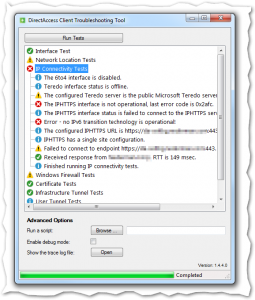
Microsoft Windows DirectAccess Client Troubleshooting Tool
http://www.microsoft.com/en-us/download/details.aspx?id=41938
Be sure to click the “enable debug mode” before scanning to get all the juicy details.
USB Tree View
Deployment, Drivers, OSIt is not soo much better than the devicemanager but still it seem a bit more accessable.
Download it here;
http://www.uwe-sieber.de/usbtreeview_e.html
Direct link;
http://www.uwe-sieber.de/files/UsbTreeView.zip