I have been trying to recall the name of this little addon to Outlook for ages now, a few of my friends really need this to keep a valid backup of their Outlook PST file.. Fianlly I rediscovered it..
The problem is that some use online backup services, and once they start windows they launch Outlook – subsequently the online backup is unable to ‘lock’ their PST file and their Outlook data file newer gets backed up..
This little add on will a specified intervals create a backup copy which will obviously not be ‘locked’ as an open file and can thus be backed up without issues.
Hopefully the Outlook 2010 version will become available soon?
http://www.microsoft.com/downloads/en/details.aspx?FamilyID=8b081f3a-b7d0-4b16-b8af-5a6322f4fd01
By applying the fix below it should be possible to make the older versions work with Outlook 2010;
http://support.microsoft.com/kb/2030523
So my manager at work was in a generous mood lately, and had gotten all of us IT-geeks iPhone4’s, well I was kind of happy with my HTC Wildfire android 2.2 phone but not impervious to a new fancy device so I wanted to give this iPhone thing a spin just for the fun of it..
First thing was of cause to jailbreak the damn thing, why should Apple decide what I put on my phone!? iOS 4.2.1 was a bit of a challenge if you did not have an Apple computer to jailbreak it from, however Greensn0w Greenp0ison (thanks Jared) just recently released a working jailbreak so I finally got around to jailbreaking the thing (my manager had also commented on my not yet using the new phone, so timing was excellent).. Jailbreaking went fairly easy, Greensn0w is quite simple and easy to use (an on-screen guide actually tell you what to do when and how, it’s to do with timing)..
My nephew Nick Dalmose pointed out that I should install a “source” into cydia called Hackulo.us which would bring additional installation options to Cydia, however this seem a bit dodgy 🙂 but if you are the adventurous type then you may want to take a look.. Once you install the “Hackulo.us” source you should then install “Installous 4” which will expand your installations options many times. Guide; Cydia -> Manage -> Sources -> Edit -> Add -> “Hackulo.us” -> “Hackulo.us” -> “Installous 4” and you are up and running. Now I do not endorse piracy, so use at your own discression – obviously you should abide by your country’s legislation.
Other than that there are a bunch of cool apps available via Cydia that are not in the Apple App-Store, these may not be super useful to “Joe the plumber” but if you are just a tad geeky then it’s not without it’s charm.
Anyhow, have fun with your jailbroken device (but for god’s sake DON’T allow it to update when iTunes tell you there are new updates… that is SO NOT compatible with a jailbroken device)..
A co-worker (Tnx Mr. Grøn) was kind enough to share this link to a place that can assist you with finding the right jailbreak for your device; http://iphoneblogr.com/jailbreak-wizard
Jared from http://iphoneblogr.com/ was kind enough to correct me on a few points, so be sure to read the comments and also drop by http://iphoneblogr.com/ which seem to harbour a few tips’n tricks also..
Update/addition;
My Co-worker Mr. Grøn again came up with something quite cool, a totally neat cover for your iPhone4 (sadly the headphone adapter then become incompatible with my headset, it is clearly designed for the standard iPhone headset). It is the coolest phone cover I have seen so far (slightly expensive at us$ 80 though): http://www.elementcase.com/iphone4.html
ps; the headset compatibility issue could be solved by buying an adapter like this on ebay;
https://readmydamnblog.com/wp-content/uploads/2015/02/toplogo4.png00Mikehttps://readmydamnblog.com/wp-content/uploads/2015/02/toplogo4.pngMike2011-02-15 21:39:302011-02-15 21:39:30The fine art of Powerpoint’ing

Outlook auto PST file backup
Backup, SecurityiPhone4 – god damn
GadgetsSo my manager at work was in a generous mood lately, and had gotten all of us IT-geeks iPhone4’s, well I was kind of happy with my HTC Wildfire android 2.2 phone but not impervious to a new fancy device so I wanted to give this iPhone thing a spin just for the fun of it..
First thing was of cause to jailbreak the damn thing, why should Apple decide what I put on my phone!? iOS 4.2.1 was a bit of a challenge if you did not have an Apple computer to jailbreak it from, however Greensn0w Greenp0ison (thanks Jared) just recently released a working jailbreak so I finally got around to jailbreaking the thing (my manager had also commented on my not yet using the new phone, so timing was excellent).. Jailbreaking went fairly easy, Greensn0w is quite simple and easy to use (an on-screen guide actually tell you what to do when and how, it’s to do with timing)..
My nephew Nick Dalmose pointed out that I should install a “source” into cydia called Hackulo.us which would bring additional installation options to Cydia, however this seem a bit dodgy 🙂 but if you are the adventurous type then you may want to take a look.. Once you install the “Hackulo.us” source you should then install “Installous 4” which will expand your installations options many times. Guide; Cydia -> Manage -> Sources -> Edit -> Add -> “Hackulo.us” -> “Hackulo.us” -> “Installous 4” and you are up and running. Now I do not endorse piracy, so use at your own discression – obviously you should abide by your country’s legislation.
Other than that there are a bunch of cool apps available via Cydia that are not in the Apple App-Store, these may not be super useful to “Joe the plumber” but if you are just a tad geeky then it’s not without it’s charm.
A few examples;
SBSettings
LockCalender
Winterboard (hide the clock)
LockMS
Anyhow, have fun with your jailbroken device (but for god’s sake DON’T allow it to update when iTunes tell you there are new updates… that is SO NOT compatible with a jailbroken device)..
A co-worker (Tnx Mr. Grøn) was kind enough to share this link to a place that can assist you with finding the right jailbreak for your device;
http://iphoneblogr.com/jailbreak-wizard
Jared from http://iphoneblogr.com/ was kind enough to correct me on a few points, so be sure to read the comments and also drop by http://iphoneblogr.com/ which seem to harbour a few tips’n tricks also..
Update/addition;

My Co-worker Mr. Grøn again came up with something quite cool, a totally neat cover for your iPhone4 (sadly the headphone adapter then become incompatible with my headset, it is clearly designed for the standard iPhone headset). It is the coolest phone cover I have seen so far (slightly expensive at us$ 80 though):
http://www.elementcase.com/iphone4.html
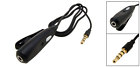
ps; the headset compatibility issue could be solved by buying an adapter like this on ebay;
The fine art of Powerpoint’ing
Fun