As of right now I haven’t really gotten my package to work, I have to include an old version of Java with a link to a web-site. But even if I set the registry to override it still fail to launch the old java, if no java is on the machine in advance it works like a dream.. We are currently using the old 4.2 sequencer so I might try the 4.5 version to see if any improvements has been made.
So I stumbled across a Kingston Data Traveller 128gb USB flash drive for US$ 27,- on Ebay.co.uk – now with a retail price of US$ 527,- this is beyond totally cheap.. Sadly it is likely a fake drive, but hey with the PayPal buyers protection program (and a price as low as this) I’m not that concerned about possibly loosing a penny or two… Also it would be interesting to get a fake pen to the lab and see how it works under the hood.
And who knows, I may just be lucky and get a bargain 😉

Softgrid tool and guide
Deployment, Virtual- A super guide to Softgrid building by one of the Guru’s on the field (Chris Lord).
http://myitforum.com/cs2/files/folders/120058/download.aspx
- A neat util to explore Softgrid packages without installing the sequencer. SFT Explorer.
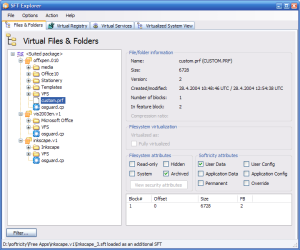 http://www.virtualapp.net/sft-explorer.html
As of right now I haven’t really gotten my package to work, I have to include an old version of Java with a link to a web-site. But even if I set the registry to override it still fail to launch the old java, if no java is on the machine in advance it works like a dream.. We are currently using the old 4.2 sequencer so I might try the 4.5 version to see if any improvements has been made.Kingston 128gb flash drive (Fake?)
GadgetsAnd who knows, I may just be lucky and get a bargain 😉
A few interesting links when it comes to fake USB pens;
http://sosfakeflash.wordpress.com/article-list/
http://fixfakeflash.wordpress.com/
http://reviews.ebay.co.uk/BEWARE-of-FAKE-128GB-256GB-USB-Flash-Drives-on-eBay_W0QQugidZ10000000001236067
Keyboard confusion
OSHave you ever had to support users with a different national keyboard than yours?
If so you may have noticed that national keyboards can vary quite a lot!?
Anyway, here is a few links to graphical depictions of national keyboards, then you at least stand a fighting chance 🙂
http://en.wikipedia.org/wiki/Keyboard_layout
http://msdn.microsoft.com/en-us/library/cc195104.aspx