If you are a sysadmin, then you know the problem with services of vital equipment that keep failing every now and again!? So what do you do? Wait for the users to start calling, buy an expensive monitoring solution or just do some simple scripting?
Well I’ll just give you a quick brief on how to setup the cheap (free) scripted solution that will help keep your users happy and the services running.
I was inspired by an article at; http://www.intelliadmin.com/index.php/2010/01/get-notified-when-a-service-fails/
which was quite cool except he rely on a third party utility for mailing AND he does not relaunch the service.. I have chosen to create a VBS script that will E-Mail AND re-launch the failed service in one sweep.
Ok here goes.
First of all log on to the server/workstation in question (the machine where the service is running).
Download my vbs script here (you may need to rightclick and choose save as)
Modify this part of the script in notepad with your details (smtp server, email address etc)
Save the file to somewhere on the C drive (I usually use “c:\windows\schedule”)
Now enter “Computer management” (right click on My Computer and choose “Manage”)
Select the service you wish to modify/monitor and double click it
Modify the service as follows (you will need to modify this if you use another location for the script)
You will note that I set the script to run at the “second fail” not the first, you can set it to run at the “first fail” if you like – to avoid being bombarded I just choose first to be informed the second time a service fail.
The service name (described in the script) is NOT the displayname, it is the REAL name of the service, you can find this here;
And viola you are done, from now on you will get an E-Mail every time a service has failed twice (or the first time if you prefer).. It’s all very basic but neat.
https://readmydamnblog.com/wp-content/uploads/2015/02/toplogo4.png00Mikehttps://readmydamnblog.com/wp-content/uploads/2015/02/toplogo4.pngMike2010-02-17 20:11:582010-02-22 09:44:42Get notified when a service fails
I just spend a few hours browsing around Ebay for interesting gadgets, and actually found a few;
First up, I actually ordered one of these – a SATA HDD docking station;
Now this is clever, now I got both a card reader AND a HDD cradle, what need do you have for a HDD cradle you say? Well now you can buy cheap SATA HDD’s and easily copy data to them for storage (no need for bulky cases and power supplies).. Quite easy and simple.. and cheap as well I got this for about £ 17,-
WiFi;
Having problems with reception or just going war-driving? Well this gadget/wifi reciever claim up to 1000 feet coverage. Not something I need, but interesting never the less.
Hand size wireless keyboard for Media Centers, PS3, XBox 360 etc.
A cool small keyboard for your PS3 or mediacenter.. If I ever get around to either I would consider one of these for sure 🙂
https://readmydamnblog.com/wp-content/uploads/2015/02/toplogo4.png00Mikehttps://readmydamnblog.com/wp-content/uploads/2015/02/toplogo4.pngMike2010-02-16 23:14:312010-02-16 23:16:42Gadget night at EBay
I somewhere read about this software a while ago called “Boxee”, it’s a new mediacenter software which can be downloaded for free from http://www.boxee.tv But with so much mediacenter software out there it got lost in the masses. Anyway, recently I was reminded as D-Link is rattling their sable with the forthcoming release of the Boxee Box (well that is hardly going to be the name but still).. It looks VERY interesting especially with a full qwerty keyboard being merged into the very neat remote that come with it, and it does seem somewhat more interesting than the WD Live TV (A LOT more apps/widgets) and a more finished design overall.
It does indeed look interesting. Boxee seem to be based upon XBMC (X-Box Media Center) http://xbmc.org/download (which I btw still use on my old trusty X-Box 1 Classic)
Should you want to preview the experience you can download the free software for your pc/mac here http://www.boxee.tv/box
The box is generally good at recognizing your video and music files (even series etc), BUT if it does not recognize the media file (it does so from the naming of the file) it wont show it :-/ thus you will need to rename it to a naming convention it understands which seem silly and acquad. From what I can tell it will be getting the data (including photos) from IMDB.
I had some issues getting it to accept a share on a Windows 2003 server, I could ‘bypass’ this by mapping the share as a drive letter on my Win 7 machine where I ran Boxee but I am still puzzled as to why it did not seem to accept a simple Windows Share.
A further cause of concern is, what data is reported back to the producers of this software!? Do they get the complete list of my music, video etc. archives? Sadly I don’t know which concerns me as you have to register to run the software 😐
https://readmydamnblog.com/wp-content/uploads/2015/02/toplogo4.png00Mikehttps://readmydamnblog.com/wp-content/uploads/2015/02/toplogo4.pngMike2010-02-16 22:23:372010-02-16 15:25:37Boxee the “WD Live TV” killer..

Get notified when a service fails
Network, OS, Print, Security- First of all log on to the server/workstation in question (the machine where the service is running).
- Download my vbs script here (you may need to rightclick and choose save as)
- Modify this part of the script in notepad with your details (smtp server, email address etc)
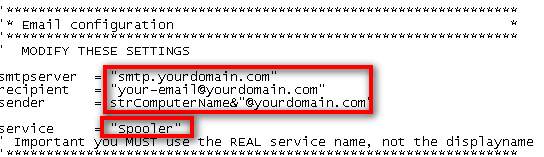
- Save the file to somewhere on the C drive (I usually use “c:\windows\schedule”)
- Now enter “Computer management” (right click on My Computer and choose “Manage”)
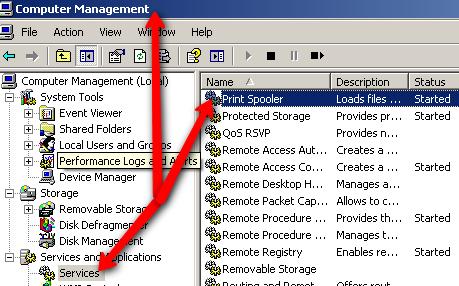
- Select the service you wish to modify/monitor and double click it
- Modify the service as follows (you will need to modify this if you use another location for the script)
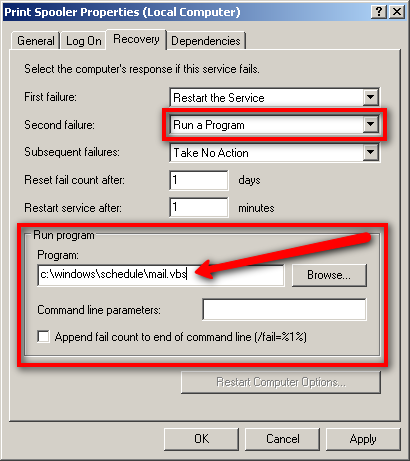 You will note that I set the script to run at the “second fail” not the first, you can set it to run at the “first fail” if you like – to avoid being bombarded I just choose first to be informed the second time a service fail.
- The service name (described in the script) is NOT the displayname, it is the REAL name of the service, you can find this here;

And viola you are done, from now on you will get an E-Mail every time a service has failed twice (or the first time if you prefer).. It’s all very basic but neat.Gadget night at EBay
GadgetsI just spend a few hours browsing around Ebay for interesting gadgets, and actually found a few;
First up, I actually ordered one of these – a SATA HDD docking station;
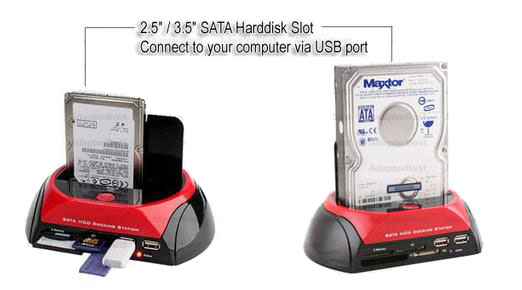
Now this is clever, now I got both a card reader AND a HDD cradle, what need do you have for a HDD cradle you say? Well now you can buy cheap SATA HDD’s and easily copy data to them for storage (no need for bulky cases and power supplies).. Quite easy and simple.. and cheap as well I got this for about £ 17,-
WiFi;

Having problems with reception or just going war-driving? Well this gadget/wifi reciever claim up to 1000 feet coverage. Not something I need, but interesting never the less.
Hand size wireless keyboard for Media Centers, PS3, XBox 360 etc.
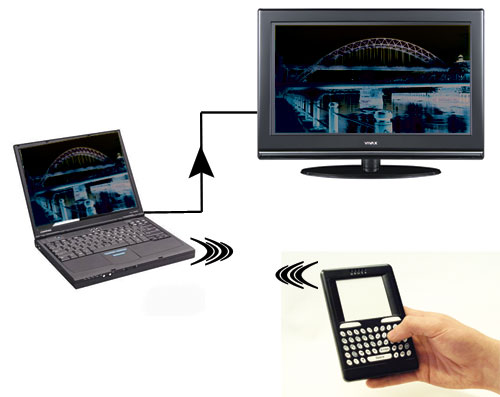
A cool small keyboard for your PS3 or mediacenter.. If I ever get around to either I would consider one of these for sure 🙂
Boxee the “WD Live TV” killer..
Gadgets, TV, VideoI somewhere read about this software a while ago called “Boxee”, it’s a new mediacenter software which can be downloaded for free from http://www.boxee.tv But with so much mediacenter software out there it got lost in the masses. Anyway, recently I was reminded as D-Link is rattling their sable with the forthcoming release of the Boxee Box (well that is hardly going to be the name but still).. It looks VERY interesting especially with a full qwerty keyboard being merged into the very neat remote that come with it, and it does seem somewhat more interesting than the WD Live TV (A LOT more apps/widgets) and a more finished design overall.
It does indeed look interesting. Boxee seem to be based upon XBMC (X-Box Media Center) http://xbmc.org/download (which I btw still use on my old trusty X-Box 1 Classic)
Should you want to preview the experience you can download the free software for your pc/mac here http://www.boxee.tv/box
A few notes though;
A quick look at what formats it recognizes;
Video:
Lyd:
Billeder: