Various cool software and more

Interested in Crypto?  then you should read this interesting blog post on Kryptos (see photo).
http://www.wired.com/threatlevel/2010/11/clue-kryptos/

Kryptos is a legendary “sculpture” with an embedded secret message hidden by the designer that has yet to be uncovered.
Read about Kryptos here; http://en.wikipedia.org/wiki/Kryptos

In a display of just how horrific federal agencies can use the Anti Terror laws etc. to bully or harass people of a different opinion you should read;

Another Hacker’s Laptop, Cellphones Searched at Border
http://www.wired.com/threatlevel/2010/11/hacker-border-search/

The sum of the article is that known and respected computer-security researcher Moxie Marlinspike was detained by federal authorities for 4½ hour when reentering USA, his equipment was confiscated and possibly cloned (returned to him afterwards), all because his name has made it to a federal watch list.

Comment by Mike@Readmydamnblog
This is  just so absolutely absurd, it’s a clear proof on how the new Anti Terror laws etc. are being abused by law enforcement to harass people that do not play by their tune. Information wants to be free, you can’t bully people into submission.

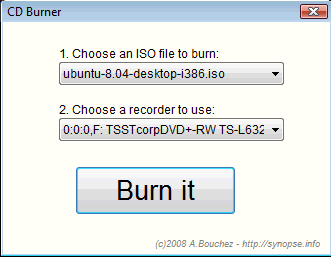
Have you ever had to explain to a non IT person how to burn an ISO image? It can be a challenge, and understandably so – if you don’t understand the fact that an ISO file is not just a regular file then it does not make much sense..

Anyhow, here is a good tip for you;

Download ISOCDBURNER from this site;
http://bouchez.info/cdburner.html

It is almost fool proof 🙂  Only thing to note is that the program file need to be in the same directory as the .ISO file, but other than that nothing can go wrong 🙂  even your aunt, mother or sister can do this 🙂

Need a few more features but still a fairly foolproof software, take a look at this;

http://www.isoimageburner.com/

Have you some old MS-Dos program lying around that you for some reason wish you could run, but as you installed Windows 7 64bit this is not possible!?

Well then this is for you, DOSbox is a free dos emulator that does a REALLY good job of executing these old apps.  It will even emulate a SoundBlaster Pro soundcard so you will be able to get sound and all.  So if you have Monkey Island I lying around somewhere now is your chance to get all nostalgic 🙂  Oh yeah, it is as with so many other cool things FREE 😀

http://www.dosbox.com/download.php?main=1

Watch how it can even run old DOS demos;

On the subject of ISO files (previous post), if you have downloaded a bootable ISO file and want to do a quick preview of it – then try MobaLiveCD.

MobaLiveCD is a quite simple little utility that will provide an instant emulation of a system, thus you start MobaLiveCD and tell it to ‘boot’ the ISO file of your choice and BAM without any fuss you will see the menu of this CD/DVD.  Really cool.  Ok, one minor issue with this is that the speed of the thing is not great, for starting small menu driven cd’s/dvd’s it’s great but for starting a Linux live cd it is hopeless – so I guess it’s more a tool to quickly see what’s on a cd/dvd than a virtual pc kind of thing – but hey it is free.

http://www.youtube.com/watch?v=Uwwdv9TJah0
Available in HD


http://mobalivecd-en.mobatek.net/index.php

Once in a while you get hold of an ISO file (an ISO file is basically just an image of a CD/DVD/BLUE-RAY disk) and need to access the content of this file, there are several ways of doing this;

1) You can burn the ISO file to a media and read it this way.

2) You can extract the ISO file to a folder using a utility (WinRar is very good at this).

3) you can mount the ISO file as a virtual CD/DVD eg. use Deamon tools lite.

I would suggest option 2 or 3.

Anyhow, David Davis has written a nice beginners guide on the subject, so be sure to check it out at;
http://www.windowsnetworking.com/articles_tutorials/Mounting-ISOs-Windows-7-Free-Tools.html

As you may have read I jumped on the Android wagon earlier, it’s a cool phone not quite as stylish as the iPhone but a LOT cheaper and more open.

One annoying thing however is, that applications ALL seem to require obscure access to run – access to geolocation, access to sim card, access to contacts, access to sd card, access to make phonecalls and full access to internet… and it’s not as on the iPhone where you are asked if this is ok, no once you install the software you are informed about the rights the software wants and you then have two options install or not..  strange and annoying, why can’t I select what I want to give access to?

Anyhow, what we need is a firewall for the device, and someone has been kind enough to make one Droidwall 😀  sadly it requires root access 🙁
http://www.appbrain.com/app/droidwall-%28root-required%29/com.googlecode.droidwall

I was getting tired of the constant disk activity on my workstation, I have  1.5TB diskspace on it and Windows search seems to enjoy joyriding these disks as if it was surfing on sunny beach..

Anyhow, I figured out how to turn the darn thing off, however that had some dire results – disabling search means COMPLETELY removing all search capabilities, I was stunned after the reboot – F3 did no longer work, Win+F did not work and all search boxes was removed.  Under WinXP disabling Windows search just meant that your search was not indexed, but that is in the past, believe me Windows won’t work without Windows Search..

So my next assignment is to figure out how to minimize the disksurfing, it must be possible..  a lot of my HDD space is stuffed with files that only rarely changes and thus updating the index of these ought not to be nessesary.  If you have any good tips on how to minimize the constant indexing let me know 🙂

Read more on disabling Win7 search and the consequenses;
http://www.sevenforums.com/tutorials/25343-windows-search-turn-off.html

The issue came up today when a coworker told about his Windows 2000 machine he had at home that he had forgotten the password for, now for corporate use we have the Microsoft ERD commander cd (previously Winternals) which works perfectly..  but that is for corporate use (SA license required)..

Anyhow, I remembered there was some strange utility that could do the same thing, it took a little googeling but I quickly found it it’s;
http://pogostick.net/~pnh/ntpasswd/

Free and all 🙂

Another approach would be, find KonBoot (the first version was free, but it has now gone commercial) it may be a bit hard to find the free version but it is out there and works..  Boot with KonBoot, bypass windows logon (password can be bypassed by leaving the field blank), now create a new admin account (eg call it “admin”)- set password – make this new user member of the local administrators group.  Now boot without KonBoot and login with this new account, you can now change the password for the real administrator account…  (it may also be possible to change the password for the administrator account while booted via KonBoot, but I am not 100% on that)..

I managed to find KonBoot here; http://www.darknet.org.uk/2009/06/kon-boot-reset-windows-linux-passwords/ 

Problemo solved 🙂