Various cool software and more

Well today I’m on the iPhone 4, however when I had my HTC Wildfire Android phone I was missing a good Audiobook player but never did manage to find one..  Now when it is not that important I by accident stumbled across this one; http://www.astroplayer.com/ which seem to support the very important .M4B format (the format for most of my audiobooks as I had an iPod before).

Companel – If you are using Windows 7 this may be an interesting util for you, it allow you to somewhat customize the “My Computer” view and add additional items to the default display.

I do find this quite useful as I often start Windows File Explorer via “my computer”.

And as with most good things it’s free 🙂

more info here;
http://www.ghacks.net/2011/03/10/companel-manage-my-computer-control-panel-items/

It is stated in;
http://www.governmentattic.org/4docs/NSA_AmerCryptColdWarBk4_1999.pdf  (around page 11 in the PDF)

That the CIA in the 1980’s found an early version of what was basically a keylogger in US Typewriters (IBM Selectrics), it was suspected that these had been installed by KGB during their way through Russian or Polish customs, data collected from the typewriters was collected and emitted via radio transmissions.

With that in mind, I am afraid to think what is possible today with the technology we have now 🙂

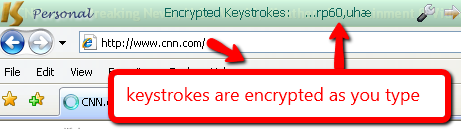
I just stumbled across this lately, it’s a piece of software you install that should insert itself as a driver between the keyboard and the OS and encrypt all keystrokes – the idea would be that it would foil keyloggers.

An interesting concept, however I’m not fully convinced – I guess that I don’t fully understand how this works – but I tried installing it on a test machine and it did no harm – so I guess it won’t do any harm installing it.  There is a free version that works with IE and other popular browsers – to make it work with everything you need the pro (payed) version – IE is fine but just how do you test a product like this?  Install a keylogger yourself *lol* well let’s see…

http://www.qfxsoftware.com/

a couple more detailed reviews here (although they did also omit installing a keylogger to test the software ;-));  
http://www.brighthub.com/computing/smb-security/reviews/27606.aspx
http://www.vikitech.com/830/protect-yourself-from-keyloggers-with-keyscrambler

I am working on a script to create the directory structure for our new file servers, one of the steps is to create the shares which is easy enough;

net share <snarename>=<path> /grant:<user>:FULL (for full access obviously, but as file rights are controlled by NTFS this is less important).

Anyway one thing popped up, how about ABE (Access based enumeration) on a Windows 2008R2 box?  On Windows 2003 it was a ‘patch’ that needed downloading how about Windows 2008?  Well simple enough it’s as expected embedded and can be found under the advanced settings for the share in the “Share and storage management” mmc.  Sadly enough there does not seem to be any switch for the “net share” command that will enable this, the default for “net share” is ABE = off so you have to enable ABE manually afterwards 🙁

BTW; ABE is basically a feature that tell the server “only show the user the files he/she has access to” so the users will not see the “Top Secret” folders etc.

Read more and see the nice guides etc here;
http://blogs.technet.com/b/hugofe/archive/2010/06/21/windows-2008-access-based-enumeration-abe.aspx

Nothing new here, just a quick way to block google ads via a simple addition to your hostfile – Not that I am against Google ads (I use them myself on this blog), but sometimes they are put in annoying places and besides I respect that some people just don’t like advertising.

Here’s how to;

Fire up your Notepad (if you are running Vista,7 you MUST launch in administrator mode – rightclick notepad and select “run as administrator”), open the file “hosts” found here; c:\windows\system32\drivers\etc.

Now add these two lines to the bottom of the hosts file (there should be a tab between the numbers and text);

127.0.0.1 pagead.googlesyndication.com
127.0.0.1 pagead2.googlesyndication.com

save and your done, no more google ads.

A consultant mentioned a rather cool trick to me some time ago, and I think it’s worth a mention here.

We have a Microsoft Hyper-V cluster with 3 nodes, now these nodes have something called “Cluster Shared Volumens” which is their disk-pools – an annoying fact about these is that this “shared volume” is not represented as a drive letter so regular monitoring of diskspace does not warn you about low disk space – this particular problem was resolved via a script on our MS-Scom server but that is not “the trick”.  The trick is, let’s say that the “Shared Volume” is low on diskspace on a Friday and run out of space during the weekend – now how do you with the least downtime get it back online?  Sure you can log in to your san, expand the disk and then to the server and extend the volume, but all of this takes time and is a bit tedious via your smart phone when it happens Saturday night when you are at the cinema with your girlfriend 🙂  The trick is to create a ‘dummy’ file on the shared volume that you simply can delete once diskspace is depleted thus freeing up space in a second – let’s say you create a 5 – 10 or 15 GB file that you can simply delete freeing up 5 – 10 or 15gb of diskspace in a second this could really save your weekend 🙂

Anyhow, it’s quite easily done via a buildin command in Windows;

This command will create a file called emergency;

15gb;
fsutil file createnew emergency 15000000000
10GB;
fsutil file createnew emergency 10000000000
5GB;
fsutil file createnew emergency 5000000000

once you run out of diskspace you simply delete this “emergency” file and immediately free up space causing the least downtime and possibly buy you time to regular business hours, quite simple but yet clever.  The single drawback is obvious you ‘waste’ the diskspace you are reserving – but hey diskspace these days cost so little so it’s hardly worth mention.

An advancement of this trick would be to implement automation – so that the ’emergency’ file would be erased automatically if the “Cluster Shared Volume” run out of disk space.

In a recent post (https://readmydamnblog.com/?p=1877) I mentioned Driver Magician Light the free version of Driver Magician, now it would seem I managed to find yet another product that does the same completely for free (and this not as a limited light version)..

Double Driver (odd name, but hey..)

Get it here;
http://www.boozet.org/dd.htm

An older review here (older version);
http://dottech.org/freeware-reviews/7225

Also there is still DriverMax;
http://www.drivermax.com/
However I never really liked this product, it’s complicated navigating and as I recall it requires some kind of registration (free as I reacll, but I don’t like having to register anyhow).

This is, as with many of my other posts, mainly a reminder to myself to remember something cool I once stumbled across. More than once I have had to search high and low to remember this site, it is cool but not something you need every day.

This site offers many different server, user and other management solutions, common for all is that they are integrated as webserver services – thus you can delegate management (Provision) assignments (server management, user management, self service and what not) to AD users without escalating their AD rights..  An example, you can assign “Joe the plumber” (a regular Domain User) rights to reset passwords for all the other Plumbers in his department – thus freeing help-desk personnel to do more important assignments.

How it works, well it’s fairly simple actually – the solution/product run on a web-server, here a service account has “Domain Admin” rights (or lower if required) and can thus perform the various tasks that users ask it to do via the web-interface – the solution/product (web-application) then manages who can do what and furthermore logs all that is done and by whom.

The site offer several 30 day free evaluation versions some of which will even work as free versions (limitations apply) after the 30 days.

The solutions are used by numerous large companies (NASA, Sony and GE Capital just to mention a few) so it cannot be completely off.

See more here;
http://www.manageengine.com/products/ad-manager/index.html

Other tools in the same product range;
http://www.quest.com/active-directory/

A YouTube web-cast of Quest’s solution (1 hour);

A YouTube video intro to AD Manager Plus (not super good nor official, but it may give you some idea);

Microsoft is also about to release solutions that can perform some of these tasks;
http://www.microsoft.com/systemcenter/en/us/service-manager/sm-end-user.aspx
http://www.microsoft.com/systemcenter/en/us/essentials/sce-overview.aspx

I just stumbled across this nice little free util, it’s sort of a taskmanager for your Hyper-V server..

Cool it’s free, however I’m slightly sceptical when it comes to the performance it reports – I feel my server should be under a more heavy load – but hey I’ll give it a spin and see how I like it.

get it here;
http://www.manageengine.com/free-hyperv-performance-monitor/download.html