A very strange problem with a very strange resolve.

So we are deploying a bunch of virtual servers and yesterday I found myself in a heap of trouble, I had a server that I needed to be ready but it kept failing the PXE boot.  Normally you would just delete the virtual server and create a new and the problem would likely be solved, however these servers are created by a script which creates a bunch of servers and a bunch of MDT settings and thus re-starting the process would require re-creating a bunch of servers.

The error I got was; PXE-E55: ProxyDHCP service did not reply to request on port 4011.

When I looked in the PXE log on the PXE server however I found;

MAC=02:00:AA:55:1E:02 SMBIOS GUID=4BDBDC9E-FD92-4BBB-BCA3-2D3A0752C049 > Device found in the database. MacCount=1 GuidCount=0 smspxe 01-06-2011 10:21:21 2364 (0x093C)

This appeared like everything was ok, so I tried logging on to the SCCM server and “Cleared last PXE advertisement” but still no luck, and following this I was unable to do so again as from now on SCCM stated that there was no PXE advertisement to clear (even though I tried PXE booting and got the “Device found in the database” in the pxe log).

Anyhow, I moved on to deleting the computer object on the SCCM server and then re-importing it manually (note; we use static ip on our virtual servers, these are created via the create script to avoid MAC conflicts) with the same MAC.  This did no difference, still the PXE log stated the same, Device found in database, but DHCP kept hanging.  I restarted both the SCCM, DHCP and PXE servers but no luck.

So after a bit of googeling which did not really turn up anything I out of fustration tried to set the MAC address to dynamic and booted the server again, this time everything worked fine as an unknown system – thus the connectivity was obviously fine – I even noticed that the GUID stayed the same.  Anyhow more puzzled I set the MAC address back to the static address from before and viola the PXE boot started and worked like a charm..

I have no idea why, my guess would be that the GUID somehow was cached in some stalled state and the the change of MAC somehow jolted that state.

Anyway, changing the MAC address may be worth a try if you find yourself in a similar situation.

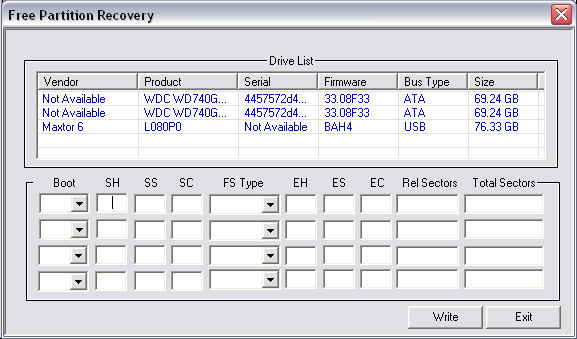
Just stumbled across a free util for advanced NTFS partition repair that I wanted to share, ít may just come in handy someday 🙂

http://www.dtidata.com/resourcecenter/2008/01/25/free-ntfs-partition-repair-data-recovery-software/

I have twice seen this issue, you try to log on to a Windows 2003 server remote via RDP and get a black screen with black text – now you can still log on but you can’t read what you write on the logon screen.

The issue appear to be rather trivial to resolve, yet I am still puzzled as to what causes the issue in the first place.  A colleague of mine Anuphol Urailat actually found a MS article on this http://support.microsoft.com/kb/906510/en

The problem is that the “Color” section under “Control Panel” in “.Default user” in the registry is set to “0 0 0” (Black) for everything, you simply export a clean “Color” section from another Windows 2003 box and viola everything is back to working condition.  You can even do the import via Remote Registry edit, so it is rather trivial to resolve.

Before;

After fix;

I suddenly had the need to have a user send me some detailed info about his Windows 7 PC, and vaguely I recalled some utility that could make this as an export file you could send via email.

And sure enough this still exist under Windows 7 🙂

it’s called;
msinfo32.exe  (yes its the same name for x64)
(just hit <left windows button> + <R> on the keyboard and launch <msinfo32.exe>).
You can export the data to a text file (do this instead of the binary file it can export – I have experinced that the binary file somehow get ‘damaged’ during email transfer).

For more info look here;
http://www.winvistaclub.com/f7.html

This is clever, I don’t need it and can’t see that I ever will – but it’s still clever..

You may have heard about technologies like JBOD (Just a bunch of disks)which allow you to link a bunch of harddrives you have into one driveletter.  The upside is that you can ‘reuse’ those old drives you have lying around (normal RAID configurations require that disks be of the same size as a minimum), the downside is that there is NO redundancy/security in JBOD.

Drive Bender is similar to JBOD, it will allow you to link together free diskspace from a bunch of different drives into one single volume.  One thing that is slightly different and potentially clever is that the technology is “non-intrusive” meaning that it will not destroy the existing filesystem (NTFS) – it will simply store it’s files on the existing filesystem (as I understand the technology), you should even be able to access files on the disks without going through Drive Bender.

As mentioned I can’t think of a sittuation where I personally would need this, that however does not make it less clever 😀

Right now it’s in a beta state and by invite only, so you’ll have to sign up for the next beta round.

Pricing is not revealed, one could hope it would be free 🙂

http://www.drivebender.com/drive-bender/

An interesting new notification system for iPhones, to replace the notifications in iOS – it looks very interesting indeed..  I am just thinking, how do I install this on my iPhone – guess I’ll have to read the entire thing 🙂

Read more here;
http://techotrack.com/archives/4578

YouTube demo here;
http://www.youtube.com/watch?feature=player_embedded&v=SRU6_QnwNCE

Project page here;
http://github.com/peterhajas/MobileNotifier

You should be able to get MobileNotifier for free by adding the following repo to Cydia
http://phajas.xen.prgmr.com/repo
Originally Posted: http://thetechjournal.com/electronics/iphone/mobilenotifier-brings-ios-notification-to-your-iphonejailbreak-tweak.xhtml#ixzz1GxZxHmyk

So I was looking into the possibilities to backup my Hyper-V “farm” (well I do got a few servers running on my Windows 2008 R2 Hyper-V server ;-)), and I came to think of good old NTBackup from Windows 2000/2003.  NTBackup has however been replaced by “Windows Server Backup” which is both good and not so good, I think that the new product is likely more professional in some senses however it has some strange ideas on how to do some of it.

Anyway, I have only looked at it for a couple of hours but here are my findings, maybe you’ll find them useful in getting started yourself.

First off you must install “Windows Server Backup” on Windows 2008 R2 this is a feature – so add new feature …….

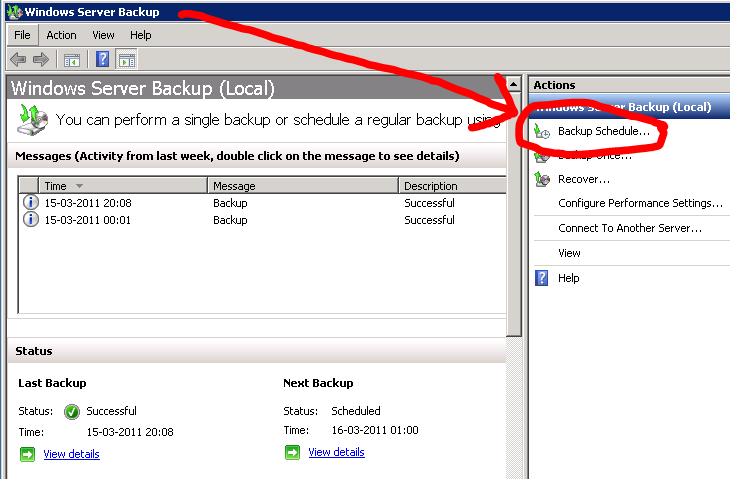
Then you would likely like to setup a new backup schedule, and here is one of those strange tings I mentioned.  The MINIMUM interval for a backup schedule on Windows Server Backup is 24 hours, that mean that the job HAS to run at LEAST every 24h – Now this may be well and good in some setups, but I don’t need a backup of my Virtual servers every 24h!?!?  My poor server would die under the workload 😀  But in the GUI there is NO way around this 🙁  I found a web-cast where a command-line workaround was outlined, but I might not have payed enough attention because I could not get it to work and thus sought alternate solutions. 

MY workaround for this scheduling issue is this;

  • Start Windows Server Backup
  • Create a “Backup Schedule” (it’s a wizzard, so it is quite easy)
  • Now close Windows Server Backup
  • Goto – “Start menu”, “Administrative Tools” and select “Task Scheduler”
  • Drill down to; “Task Scheduler Library”, “Microsoft”, “Windows”, “Backup”
  • Now edit the job “Microsoft-Windows-WindowsBackup”
  • Edit the “Trigger” and you can now set the job you created to launch whenever you want

I’m sure there are other ways, but this is easy and works.

Some screenshots;

And finally some light reading for further details 🙂

http://blogs.technet.com/b/filecab/archive/2009/04/13/customizing-windows-server-backup-schedule.aspx

http://blogs.technet.com/b/filecab/archive/2009/06/22/backup-version-and-space-management-in-windows-server-backup.aspx

Web-Cast (quite informative);
http://www.netometer.com/video/tutorials/windows-server-2008-backup/

I might drill further into this at a later point, but for now this seem to satisfy my needs.

Companel – If you are using Windows 7 this may be an interesting util for you, it allow you to somewhat customize the “My Computer” view and add additional items to the default display.

I do find this quite useful as I often start Windows File Explorer via “my computer”.

And as with most good things it’s free 🙂

more info here;
http://www.ghacks.net/2011/03/10/companel-manage-my-computer-control-panel-items/

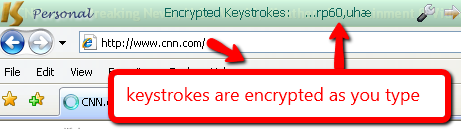
I just stumbled across this lately, it’s a piece of software you install that should insert itself as a driver between the keyboard and the OS and encrypt all keystrokes – the idea would be that it would foil keyloggers.

An interesting concept, however I’m not fully convinced – I guess that I don’t fully understand how this works – but I tried installing it on a test machine and it did no harm – so I guess it won’t do any harm installing it.  There is a free version that works with IE and other popular browsers – to make it work with everything you need the pro (payed) version – IE is fine but just how do you test a product like this?  Install a keylogger yourself *lol* well let’s see…

http://www.qfxsoftware.com/

a couple more detailed reviews here (although they did also omit installing a keylogger to test the software ;-));  
http://www.brighthub.com/computing/smb-security/reviews/27606.aspx
http://www.vikitech.com/830/protect-yourself-from-keyloggers-with-keyscrambler

I am working on a script to create the directory structure for our new file servers, one of the steps is to create the shares which is easy enough;

net share <snarename>=<path> /grant:<user>:FULL (for full access obviously, but as file rights are controlled by NTFS this is less important).

Anyway one thing popped up, how about ABE (Access based enumeration) on a Windows 2008R2 box?  On Windows 2003 it was a ‘patch’ that needed downloading how about Windows 2008?  Well simple enough it’s as expected embedded and can be found under the advanced settings for the share in the “Share and storage management” mmc.  Sadly enough there does not seem to be any switch for the “net share” command that will enable this, the default for “net share” is ABE = off so you have to enable ABE manually afterwards 🙁

BTW; ABE is basically a feature that tell the server “only show the user the files he/she has access to” so the users will not see the “Top Secret” folders etc.

Read more and see the nice guides etc here;
http://blogs.technet.com/b/hugofe/archive/2010/06/21/windows-2008-access-based-enumeration-abe.aspx