
 If you use the excellent “Free downloadmanager” (FDM) you should make sure you have the latest version and patches installed, a serious security bug was discovered on feb 2nd 2009 by Secunia.com
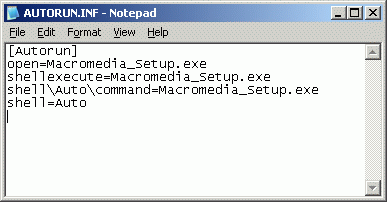 If you have ever had problems with autorun files in Windows (within a corporate environment) here is some good news for you.
If you, in your environment set up a GPO to disable autorun.inf to combat the spread of virus/malware you were likely dissapointed, yes the setting was propogated to the pc’s but it did not stop all autorun.inf’s from executing. The problem (among other things) had to do with complexities of autorun introduced with of USB devices (before it was only cd and disks).
Anyway, FINNALLY Microsoft has come up with a patch, lets just hope it works out 🙂 I have not had the opputunity to test it yet.
Patch should be introduced via Windows Update, for more details look here;u
http://www.microsoft.com/technet/security/advisory/967940.mspx
Update March 8th 2009, I tested the patch, and it DOES now work on network shares as well, excellent 🙂
I was patching a newly installed Win 2003 server, and the first thing I was met by was that the Windows Update web site could not be opened unless it was added as a Trusted site, however when trying to add the site http://update.microsoft.comI was met by a dialog box stating that “”There was an unexpected error with your zone settings. Unable to add site.“. On this server Internet Explorer Enhanced security had been uninstalled.
Solution;
- Re-install “Internet Explorer Enhanced security” from control panel, add remove programs, Windows components.
- Add the zones you need.
- If you like uninstall “Internet Explorer Enhanced security” again.
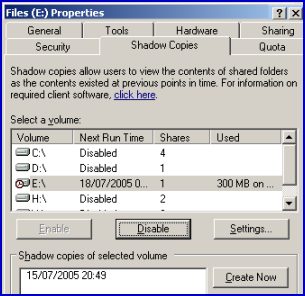 So, I had this server where I enabled Shadow Copy on the D: volume, and I could create snapshots just fine however the scheduled shadow copy jobs never ran. If I looked in “Control Panel”, “Scheduled Tasks” I could see that the job had never run, and if I tried to edit the schedule I got an error “0x8007000d: The data is invalid“. I suspected the scheduler to be the culprit, but after trying whatever I could think of and google I ended up with nada..
In the end, all I had to do was to delete one single file and viola everything works.
What Microsoft claim is that I enabled Shadow Copy before running dcpromo on a memberserver, and that thus the service (Shadow Copy) would try to use an old local account (which is deleted as the server is promoted) to schedule the jobs and subsequently fail. This in my case however was not true, however as the server was installed in Russia over our wan lines the thing might be that the server had not completed a full replication before I enabled Shadow Copy..
Anyhow, the solution can be found here;
http://support.microsoft.com/default.aspx?scid=kb;en-us;822904
And to break it down, all I needed to do was to delete the one file that was in;
%SystemDrive%\Documents and Settings\All Users\Application Data\Microsoft\Crypto\RSA\S-1-5-18
(in my case there was only one, but according to the MS site you should only delete files that begin with “d42”.
So you need to fiddle a bit with Windows Update, the reasons can be many;
- you want to centrally initiate an update
- you are paranoid and want to script a daily/weekly or monthly Windows Update (in case the automatic detection fail).
Well, for help on how to launch it on different remote machines I suggest you visit Dave’s Blog;
http://skatterbrainz.blogspot.com/2009/01/script-code-batch-running-wuauclt.html
A Desktop shortcut;
You could also simply create a desktop shortcut linking to
wuauclt.exe /resetauthorization /detectnow
This would force a Windows Updates detection to run upon clicking the shortcut, somewhat easier than launching the website.
The script you would need locally could look something like this;
@Echo off
Echo Stopping Windows Update Service
net stop wuauserv
Echo Starting Windows Update Service
net start wuauserv
Echo Forcing Windows Update detection
%windir%system32wuauclt.exe /detectnow
I also stumbled across some neat commands to try in case you are debugging Windows Update (update not working);
http://www.techsupportforum.com/microsoft-support/windows-xp-support/279270-automatic-update-not-started-error-1058-a.html
net stop wuauserv
del /f /s /q %windir%SoftwareDistribution*.*
net start wuauserv
wuauclt.exe /detectnow
_____________________

net stop bits
net stop wuauserv
%windir%system32
egsvr32.exe /s %windir%system32atl.dll
%windir%system32
egsvr32.exe /s %windir%system32jscript.dll
%windir%system32
egsvr32.exe /s %windir%system32msxml3.dll
%windir%system32
egsvr32.exe /s %windir%system32softpub.dll
%windir%system32
egsvr32.exe /s %windir%system32wuapi.dll
%windir%system32
egsvr32.exe /s %windir%system32wuaueng.dll
%windir%system32
egsvr32.exe /s %windir%system32wuaueng1.dll
%windir%system32
egsvr32.exe /s %windir%system32wucltui.dll
%windir%system32
egsvr32.exe /s %windir%system32wups.dll
%windir%system32
egsvr32.exe /s %windir%system32wuweb.dll
net start bits
net start wuauserv
wuauclt /resetauthorization /detectnow
_____________________________

net stop bits
net stop wuauserv
regsvr32 /u wuaueng.dll /s
del /f /s /q %windir%SoftwareDistribution*.*
del /f /s /q %windir%windowsupdate.log
regsvr32 wuaueng.dll /s
net start bits
net start wuauserv
wuauclt.exe /resetauthorization /detectnow
PPS. Vista/Win2008 users beware.
Stopping services etc under windows vista/2008/7 require the scripts to be run as an administrator.
 You may recall me mentioning Virus Total, this is a priceless service that allow you to upload a file and have it checked by many different antivirus engines within seconds. Excellent if you are suspicious about a file, or just if you want to be sure that the file you just downloaded is clean.
Well I did not mention another neat feature from Virus Total, a “send to” addition to Windows right click options. Once this is installed you can right click on ANY file and have it uploaded to Virus Total for analysis easy and painless.
 So you are a network administrator and are concerned about Skype (supernodes and all), well take a swing around https://www.cs.uwaterloo.ca/twiki/view/CF/SkypeConfiguration here you will find links to some very interesting Skype disections and tips on how to prevent becomming a supernode.
Be sure to read the text from Blackhat 2006;
https://www.blackhat.com/presentations/bh-europe-06/bh-eu-06-biondi/bh-eu-06-biondi-up.pdf
 Just a quick reminder to myself (and other interested), if you need to sign up for something (eg. you have to provide a valid email to recieve a download link, etc etc), then I have been using;
and this service seem to do a fairly good job.
It work like this;
- Connect to www.mailexpire.com
- Provide your current email, and select how long your temporary email should be valid for hours to 3 months. I would suggest at least a week or so (you can cancle it immideately at any time).
- Accept the activation mail you get from them (in this mail you will also find your temporary email)
You are done, now simply use the mail you got in the activation mail to get those download links etc. Its simple, safe and free 😀
 So you would like to run MSRT manually (the Microsoft Malicious Software Removal Tool, the one that comes once a month from Microsoft via Windows Updates and cleans different infections from your pc), well as written in an earlier post https://readmydamnblog.com/?p=463 you can download a version straight from Microsoft, however it turns out there is an even easier method, simply go to your “start menu”, select “Run” and enter “MRT” and hit enter..
There is even the option to launch it with parameters so you could schedule it to run at regular intervals if you would like.
.
So you are using remote desktop/terminal services and you are worried about security, well there are several things you can do to secure it among the oldies change the port number from 3389. But hold on to your horses, now there is a whole range of new options via a new utility from 2x called SecureRDP, here you are presented with options to restrict IP, MAC, Computername and a combination of these.
If you use RDP you NEED to check this out, and best of all its FREE 😀