Microsoft has released a no-nonsense simple to use, free and downloadable tool – Microsoft Security Scanner – to check and cleanup virus infections (or suspected infections).

This tool is not intended as an antivirus, it is intended as a cleanup utility for infected computers or as a tool you can download and do a double-check to confirm you are not infected (say your installed antivirus is unable to detect a certain virus/malware, then you can double check using Microsoft Security Scanner).

You can download it free from here (note the download only works for 10 days, then you have to re-download an updated version, this is to ensure the virus detection patterns are always fully up to date);
http://www.microsoft.com/security/scanner/en-us/default.aspx

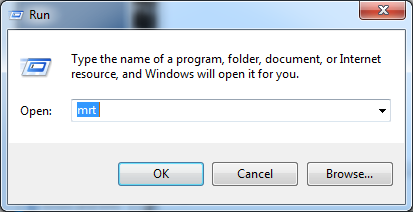
A good thing to also do is to run Microsoft Malicious Software Removal Tool from time to time – this is done automatically as part of  Windows Update, however this is only the ‘fast/quick’ scan – by starting the MRT.EXE manually you can do a FULL scan.  The Malicious Software Removal Tool is installed on all windows machines and updated/maintained via Windows Updates.

to run it;

Btw; McAfee has  a similar yet not so comprehensive utility called Stinger (also free download);
http://www.mcafee.com/us/downloads/free-tools/stinger.aspx

It is stated in;
http://www.governmentattic.org/4docs/NSA_AmerCryptColdWarBk4_1999.pdf  (around page 11 in the PDF)

That the CIA in the 1980’s found an early version of what was basically a keylogger in US Typewriters (IBM Selectrics), it was suspected that these had been installed by KGB during their way through Russian or Polish customs, data collected from the typewriters was collected and emitted via radio transmissions.

With that in mind, I am afraid to think what is possible today with the technology we have now 🙂

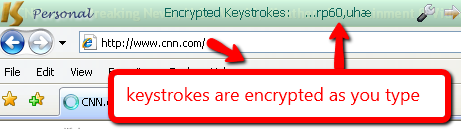
I just stumbled across this lately, it’s a piece of software you install that should insert itself as a driver between the keyboard and the OS and encrypt all keystrokes – the idea would be that it would foil keyloggers.

An interesting concept, however I’m not fully convinced – I guess that I don’t fully understand how this works – but I tried installing it on a test machine and it did no harm – so I guess it won’t do any harm installing it.  There is a free version that works with IE and other popular browsers – to make it work with everything you need the pro (payed) version – IE is fine but just how do you test a product like this?  Install a keylogger yourself *lol* well let’s see…

http://www.qfxsoftware.com/

a couple more detailed reviews here (although they did also omit installing a keylogger to test the software ;-));  
http://www.brighthub.com/computing/smb-security/reviews/27606.aspx
http://www.vikitech.com/830/protect-yourself-from-keyloggers-with-keyscrambler

Nothing new here, just a quick way to block google ads via a simple addition to your hostfile – Not that I am against Google ads (I use them myself on this blog), but sometimes they are put in annoying places and besides I respect that some people just don’t like advertising.

Here’s how to;

Fire up your Notepad (if you are running Vista,7 you MUST launch in administrator mode – rightclick notepad and select “run as administrator”), open the file “hosts” found here; c:\windows\system32\drivers\etc.

Now add these two lines to the bottom of the hosts file (there should be a tab between the numbers and text);

127.0.0.1 pagead.googlesyndication.com
127.0.0.1 pagead2.googlesyndication.com

save and your done, no more google ads.

I have been trying to recall the name of this little addon to Outlook for ages now, a few of my friends really need this to keep a valid backup of their Outlook PST file..  Fianlly I rediscovered it..

The problem is that some use online backup services, and once they start windows they launch Outlook – subsequently the online backup is unable to ‘lock’ their PST file and their Outlook data file newer gets backed up..

This little add on will a specified intervals create a backup copy which will obviously not be ‘locked’ as an open file and can thus be backed up without issues.

Hopefully the Outlook 2010 version will become available soon?

http://www.microsoft.com/downloads/en/details.aspx?FamilyID=8b081f3a-b7d0-4b16-b8af-5a6322f4fd01

By applying the fix below it should be possible to make the older versions work with Outlook 2010;
http://support.microsoft.com/kb/2030523

A barnch office in China had a virus incident where a workstation was infected with a virus, this virus created two directories on a server share named “con.” and “nul.”.  I quickly discovered that “con” and “nul” (and also “aux”, “lpt” etc etc) are protected names in Windows and you can’t create directories with such names, well you can actually by ‘cheating’;

Create dir;

md \\.\c:\con
md \\.\c:\nul

Remove dir;

rd \\.\c:\con
rd \\.\c:\nul

This is all well and good, but it does not work for folders named “con.” and “nul.”, my next thought was well perhaps there is a ‘hidden’ character after the “.” (eg. the ALT+255 char) so I piped a dir to a text file for examination (dir c:\ > output.txt) however no luck it simply ended with the “.” and that was that.  Checkdisk had no luck and utilities to unlock files had no luck.

Anyhow I put it on Technet forums and “Brent Hu” was kind enough to offer some useful advice, he pointed to a utility called “DelInvFile” from here; http://www.purgeie.com/delinv/dldelinv.htm  and in seconds the two directories was gone 😀  nice… and as the software came with 3 free deletes it did not even cost a penny, excellent.  Anyhow, if you experience invalid files/directories in your directory structure take a look at this util, it may just save your day 🙂

You better stop using your girlfriends or the dogs name as password for your WPA key on your access point, German computer sciencetist Thomas Roth  has made a proof of concept on using Amazon’s EC2 cloud service for cracking WPA keys.  By using Amazon’s EC2 service the brute forcing of simpler keys are now within reach for anyone.

Read more here;
http://stacksmashing.net/2010/11/15/cracking-in-the-cloud-amazons-new-ec2-gpu-instances/

http://stacksmashing.net/

I heard of this service on a pod-cast, the judgment was not overly enthusiastic due to the pricing but from what I could understand the service does what it promises to do.

So the ONE thing that it does seem very useful for is the “one time credit card” option, basically what this does is to create a temporary creditcard number that you can then use for your online purchase, once this transaction is done the creditcard number is revoked.  This is great if you need to order something from a dodgy site that you do not fully trust, your own creditcard is never revealed to the site you are buying from and thus should they later try to charge you extra they are out of luck.  This service would from what I can tell cost you a fee of US$ 2 or 2½ per creditcard number (if you use the as-you-go plan), I think it’s an ok price for an online purchaece “insurance”.

http://www.shopshield.net

Looking for a neat spamfilter that is easy to manage and reasonable priced?

I suggest you take a look at http://www.mailroute.info, from what I can gather it is the same guys/technology that was behind the original “Microsoft Forefront Online Protection for Exchange” (yes long and stupid name :-)) just further developed.  Pricing seem fair and as we use “Microsoft Forefront Online Protection for Exchange” at work with very great success it is worth considering.

BAE Systems unleashes an effective new laser defense system, it is a non lethal system that will allow the holder to blind and confuse the target audience by means of a three foot wide green laser beam, the effect is confusion and temporary blindness for the target, effective range is about one mile.  The company has primarily developed the technology for sea traders as a countermeasure for pirates.

Quite interesting technology I dare say.
http://www.tgdaily.com/hardware-features/53451-bae-zaps-pirates-with-new-laser-defense-system