
If you are a sysadmin, then you know the problem with services of vital equipment that keep failing every now and again!? So what do you do? Wait for the users to start calling, buy an expensive monitoring solution or just do some simple scripting?
Well I’ll just give you a quick brief on how to setup the cheap (free) scripted solution that will help keep your users happy and the services running.
I was inspired by an article at; http://www.intelliadmin.com/index.php/2010/01/get-notified-when-a-service-fails/
which was quite cool except he rely on a third party utility for mailing AND he does not relaunch the service.. I have chosen to create a VBS script that will E-Mail AND re-launch the failed service in one sweep.
Ok here goes.
- First of all log on to the server/workstation in question (the machine where the service is running).
- Download my vbs script here (you may need to rightclick and choose save as)
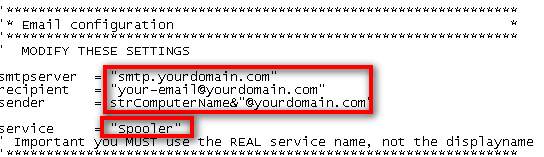
- Modify this part of the script in notepad with your details (smtp server, email address etc)
- Save the file to somewhere on the C drive (I usually use “c:\windows\schedule”)
- Now enter “Computer management” (right click on My Computer and choose “Manage”)
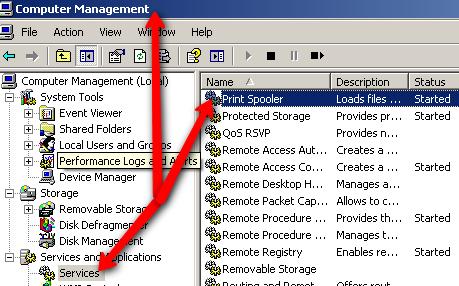
- Select the service you wish to modify/monitor and double click it
- Modify the service as follows (you will need to modify this if you use another location for the script)
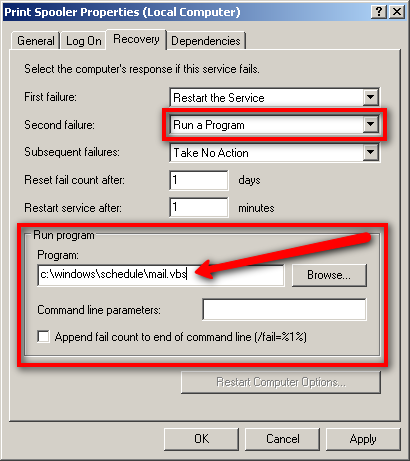
You will note that I set the script to run at the “second fail” not the first, you can set it to run at the “first fail” if you like – to avoid being bombarded I just choose first to be informed the second time a service fail. - The service name (described in the script) is NOT the displayname, it is the REAL name of the service, you can find this here;

And viola you are done, from now on you will get an E-Mail every time a service has failed twice (or the first time if you prefer).. It’s all very basic but neat.

 I have just had a few servers that somehow has failed to update their Forefront Client Security client software 🙁 The problem seem to be that Forefront cannot seem to stop the FCSAM service while updating, the service is stuck on “Stopping” and neither taskkill og any other utility seem to be able to kill it.
 If you have ever worked with Microsoft ISA server you may have heard of “GFI WebMonitor”, “GFI WebMonitor” is an add on to the ISA server (it does also exist as a standalone server application) that will allow for Malware, Virus scanning along with traffic analysis and extended logging of HTTP traffic thus protecting workstations against ‘drive by infections’ and other script dangers while surfing.
 The A5/1 encryption used to protect GSM phone conversations has long since been broken, actually just last year it was made possible to eavesdrop encrypted GSM in realtime – hence GSM telephony is today to be considered utterly insecure. Scientists have thus begun working on the 3G variant A5/3, and it would appear that a “breakthrough” has been made, not quite allowing for realtime decryption but weakening the cipher quite considerably.
 According to the Danish online newsletter/magazine
 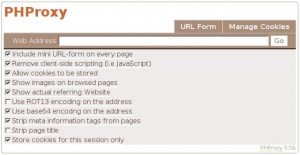 Imagine this; You are at a public wifi spot, and they have locked down what pages you may visit by simple DNS or URL filtering, and you just have to visit Rapidshare.com where one of your friends have send you this important file!? What to do? Well actually you have to do this before you wind up in this mess, but once it’s done you can use it anywhere anytime to combat situations like this.