
 I just heard one of my favorite podcasts this morning, in this they talked about Carbonite and how they have actually changed their crypto policy lately. Before you had to rely on their crypto keys, which meant that although all your data was encrypted both during transport and storage it could basically be decrypted by Carbonite employees (yes yes, court order and all I know, but still I like my data to be 10000% private), however now you can set your own AES key (256bit as I recall) and thus data is 100% private..
This does make Carbonite an interesting player once again… I may just have to give them a spin to see how it works.
Yet another player came to my attention, I have not heard about this before nor do I know much more than stated on their website; www.backblaze.com
So to summarize;
Idrive (I use this myself, but am considering Carbonite to get more space)
Pros;Cheap (around 55$ a year), versioning of files, good gui with tons of tweaking, scheduled backup
Cons;“only” 150gb storage, gui could do with an update lots of options but not pretty
Review; http://online-data-backup-review.toptenreviews.com/idrive-review.html
Review; http://www.dansdata.com/idrive.htm
Carbonite (I have not tested this myself and thus know only little about it)
Pros; Cheap (around 55$ a year), UNLIMITED storage
Cons;no versioning of files (only the latest version is backed up)
Review; http://www.maclife.com/article/reviews/carbonite
Backblaze (I have not tested this myself and thus know only little about it)
Pros; Cheap
Cons;No versioning of files
Review; http://www.maclife.com/article/reviews/backblaze
http://mozy.com/
Just learned about it, don’t know much about it.
http://www.sosonlinebackup.com/
Just learned about it, don’t know much about it. (I was warned it should be very costly).
https://spideroak.com/
Just learned about it, don’t know much about it.
KeepIT.com
Don’t even think about it 🙂
https://readmydamnblog.com/?p=80

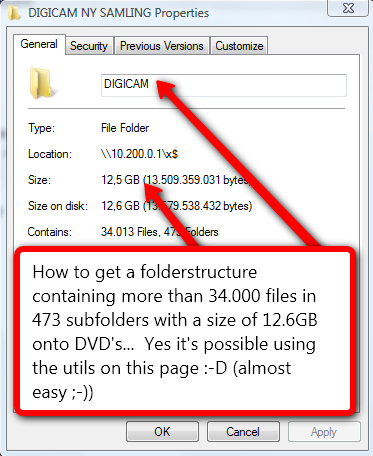 Have you ever tried to burn your collection of digital photos or mp3 files to DVD? Sure you have, how did you accomplish it? By sorting files into groups of 4.6gb and burning one dvd at the time? Most people do it this way, you could also use winrar or other and create compressed files with a size of 4.6gb (one per dvd) – however that is not optimal if you later wish to extract just that ONE file you deleted by accident or if one DVD gets corrupted…
 During my recovery from the Needhost bankruptcy (my former provider) it would seem a few posts got lost 🙁 annoying as I fear more is lost than I recall 🙁
 So you may have heard about this? Microsoft has expanded your live-id with an online drive of 25gb of free storage (and I have even heard that if you use the whole thing they will expand your storage automatically, this however is unconfirmed).
 well well, so now there is no excuse not to use it and save yourself a lot of time and pain..