Various cool software and more

So you would like to extract some files from an Install Shield (IS) installer package you have, you may as I just need a few driver files from a package.

Well first you try the extract command from Windows (as some of the Install Shield files come as .cab files) however you quickly discover that the IS.cab files are not compatible with the Windows .cab files.  WinRar is often good at extracting all sorts of files, but not the IS files. You can forget all about -e or -x for extract that does not work either.

But there is a way, you need an utility called “ISCabVu.exe”, sadly this utility is not just lying around on the net, so you need to do a bit of fiddling around to get hold of it.. 

1. Download an evaluation copy of Install Shield (any never version will likely do, do go for the latest).
2. Install it (if you don’t want to pollute your system use SandboxIE (requires 32bit os)).
3. Copy the files under “Program Files\InstallShield\2010\System” to a different location.
4. Now just run the “ISCabVu.exe” file.
5. You may be able to thin out this directory (150mb) but this may take some time and may not be worth your time.

Now the extract part is easy, see image below;
hpquickbtn

toshibaSo I am looking for a s.m.a.r.t utility to monitor the health of my harddisks..
So far I have come up with;
Drivesitter http://www.otwesten.de/drivesitter/screen.htm
Personal SmartCheck
http://www.urltoy.com/psc.htm
and a open source commandline utility
http://sourceforge.net/projects/smartmontools/

If you know of a better utility maybe even with additional monitoring capabilities do let me know..

I just stumbled across this DNS lookup utility on my way around the net, it seem quite interesting and could provide some valuable info on domain names and ip addresses.

The interface is a bit minimalistic in my view, but the info provided seem good.

Goto this website and enter a domain name in the top left corner then hit ‘I’m lucky’ and watch the magic show 🙂

http://www.robtex.com/

I spend some time on this before cracking the nut, so I thought I’d share with you all in case you ever experienced something similar.

HP_QT

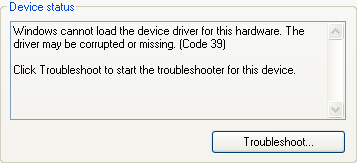
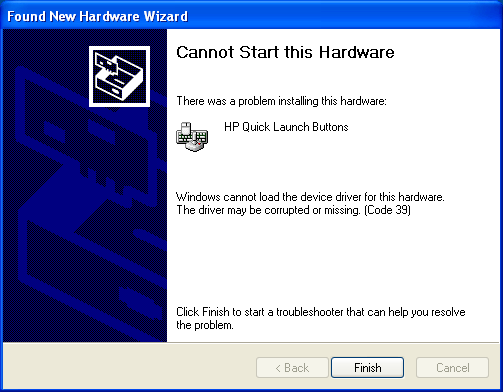
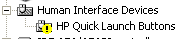
See I was hardware certifying a HP 6930p laptop for SCCM and things was fine until my attention moved to installing the “HP Quicklaunch buttons”, my first issue was that even though I extracted the installed drivers using Driver Magician or Driver Max it did not work – both programs failed to extract the certificate for the drivers thus you would have a ‘drivers not certified’ warning when installing them, well I decided to simply install the HP package with the -s switch and here things became really annoying – the installation proceeded fine and in device manager we moved from “Unknown device” to “HP Quicklaunch Buttons” but accompanied by the text “Windows cannot load the device driver for this hardware. The driver may be corrupted or missing. (Code 39)” and no amount of reboots fixed this.  I tried with numerous versions of the install package, just in case it was some issue with a specific version of the package – but all had the same result.

hpqt2

hpqt_dm

A lot of googling led me to this article where a guy named Eric has a very similar issue, he has detected a common denomitor namely  virtualization.  Eric has discovered that if he deploy a workstation using a wim image captured on a VmWare workstation and then later try to install “HP Quick Launch Buttons” he gets this issue with the ‘corrupted or missing drivers’, but if he manually installs the same machine then there is no issue. 

The solution is simple, all that is missing to make things work is three files;
hidclass.sys
hidparse.sys
hidusb.sys
these files need to be copied to “C:\windows\system32\drivers” (or the equivalent on your system), and after a reboot the “HP Quick Launch Buttons” is now working fine..  But where do you get these files from?  You can of cause get them from a different system (copy them to a usb pen or what ever), but there is another easy way around this – see these three files are all related to “Human Interface Devices” and all you need to do to have them installed (copied to c:\windows\system32\drivers) is to insert an external usb mouse or keyboard (this will launch an automated installation of these three files).  Now where inserting a USB mouse or keyboard may work for a single user it’s not really appropriate for corporate installation environments, so in our corporate setup we will be copying these three files into the C:\windows\system32\drivers folder during installation – having them there will do no harm.

roadrunner2Ever so often you need to test your Internet speed (for debugging speed issues or maybe to determine the actual speed of a new line or a customers line), in Denmark people often use the test page at www.tdc.dk (the largest telecommunications provider in Denmark) however sometimes, during my work, I need to test the Internet speed from other countries and a Danish test page does not give a reliable result in other countries.

Today I stumbled across what appear to be a very neat test page, it offers nice graphs and customization of the test.

Give it a spin at;
http://www.numion.com/YourSpeed3/Run.php

Just finished installing a few patches to a Windows 2003 box and was puzzled about one of the updates “Windows Powershell 2.0 and WinRM 2.0”, now Powershell I knew about but what is this WinRM (Windows Remote Management) all about.

Well from what I can tell it’s rather basic, it’s more or less the corporate (industry standard) replacement of PsExec.exe  from Sysinternals, a way to launch commands, scripts etc. remotely.  WinRM (Windows Remote Management) offers some additional features and can be used in scripting, from what I can tell it may also work on hardware devices that support WsManagement.

For more details look here;
http://en.wikipedia.org/wiki/WS-Management
http://blogs.technet.com/jonjor/archive/2009/01/09/winrm-windows-remote-management-troubleshooting.aspx

ffcsI have just had a few servers that somehow has failed to update their Forefront Client Security client software 🙁  The problem seem to be that Forefront cannot seem to stop the FCSAM service while updating, the service is stuck on “Stopping” and neither taskkill og any other utility seem to be able to kill it.

The errors in the eventlog go something along these lines;

Microsoft Forefront Client Security Antimalware Service
Error 1921. Service  'Microsoft Forefront Client Security
Antimalware Service' (FCSAM) could not be  stopped.

I have tried uninstalling, rebooting and reinstalling but this did not help.

The workaround suggested is to set the service FCSAM to manual, reboot, upgrade and then setting the service back to automatically – however this only works for now and thus only postpones the problem.

I have found this article on a similar problem which I will try tomorrow, this includes some additional cleanup steps;
Eg. issuing the command; sc delete fcsam

I will also try to slipstream the installation of Forefront Client Security before I retry the re-installation, description on how to do here (mind you use the latest update and not the one the article refer to);

If you live in Europe you are bound to have experienced being rejected, when trying to watch your favorite TV show on a US web-site – something in the line of “We are sorry but your IP seem to come from a country outside the USA” bummer – this is annoying as some US TV stations have cool tv shows available for free viewing (but restricted to the US).

ultrasurf9So, as I have mentioned before you can use the TOR network (http://www.torproject.org/) to proxy around this problem – but TOR is an install package that may not always be appropriate to install on a company/school pc etc, along comes UltraSurf (http://www.ultrareach.com/) a simple little portable application you can put on your USB stick.

UltraSurf will once it is started open a browser and you can browse the net with a US based IP (by proxying your traffic) thus giving you access to US based webservices.  Speed is not great but seemed acceptable and I managed to get an ok mediastream from ABC (note you may have to restart the browser when installing activex components).

A word of caution, I would not share creditcard or other confidential information on a proxyed connection, you never know who/what is inspecting your HTTP traffic, HTTPS/SSL/TSL traffic should be secure though (but still think about what you are doing).

Get it here (Free);
http://www.ultrareach.com/

Show your IP (you will notice this changes once UltraSurf is started);
http://showip.net/ or http://www.ipchicken.com/

WEBMON2009---Box-874-900If you have ever worked with Microsoft ISA server you may have heard of “GFI WebMonitor”, “GFI WebMonitor” is an add on to the ISA server (it does also exist as a standalone server application) that will allow for Malware, Virus scanning along with traffic analysis and extended logging of HTTP traffic thus protecting workstations against ‘drive by infections’ and other script dangers while surfing.

The news part is that GFI now offer a freeware version, the freeware version is however limited to logging and statistics thus the Malware and Virus protection is turned off in the freeware version after 30 days.  But still the logging and statistics functionality is not half bad for free.

So if you are looking for traffic logging and analysis this may be worth a look.

Get it here;
http://www.gfi.com/internet-monitoring-software

Is your harddisk working overtime and you have no idea why!?  We all know the sittuation, especially Windows Vista 2010-01-25_1231and Windows 7 seem to spend a lot of time working on your harddisks without no apparent reason, and it is very hard determining what process it is that is actually causing all the disk/processor activity.  Well one way of debugging this is to download procexp.exe from http://live.sysinternals.com, another approach is to try a utility I just got hold of that offers an easier overview “What is my computer doing” http://www.itsth.com/en/produkte/Whats-my-computer-doing.php 


Download it here;
http://www.itsth.com/download/getfile.php?file=WhatsMyComputerDoing_E.exe