Various cool software and more

I just read a news letter from OpenDNS in which they state that they are now offering a paid solution where you get granular control of blocked sites.  Basically this mean that you can allow yourself (or equally important persons 😉 to bypass all the site blocking your site otherwize uses..  That seem quite clever..

Sitation from the newsletter;
A lightweight and innovative approach to per-user access controls, OpenDNS Web content filtering empowers you to grant individuals on your network permission to bypass blocked pages. No appliance. No software. It works efficiently through the cloud.

arpgatewayEver heard about ARP spoofing or man in the middle attacks?  If not then this may not be for you, but if on the other hand “Yes” then here is a tool for you..

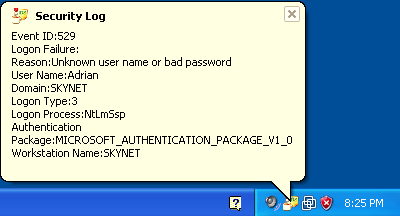
Our pal Irongeek has released this nifty small util “DecaffeinatID:” that will sit in your tray until it detects something nasty going on (like eg. attempted ARP spoofing of your default gateway) and then raise hell and bells to warn you.

Basically what it does it to monitor the MAC address of your default gateway, if this for some reason changes (which it never should) you will be warned and can take precautions.

Besides this ARP ‘shield’ the util offers a few other nifty security tricks, anyway check it out at;
http://www.irongeek.com/i.php?page=security/decaffeinatid-simple-ids-arpwatch-for-windows

securitylog

carboniteI just heard one of my favorite podcasts this morning, in this they talked about Carbonite and how they have actually changed their crypto policy lately. Before you had to rely on their crypto keys, which meant that although all your data was encrypted both during transport and storage it could basically be decrypted by Carbonite employees (yes yes, court order and all I know, but still I like my data to be 10000% private), however now you can set your own AES key (256bit as I recall) and thus data is 100% private..

This does make Carbonite an interesting player once again…  I may just have to give them a spin to see how it works.

Yet another player came to my attention, I have not heard about this before nor do I know much more than stated on their website; www.backblaze.com

So to summarize;

Idrive (I use this myself, but am considering Carbonite to get more space)
Pros;Cheap (around 55$ a year), versioning of files, good gui with tons of tweaking, scheduled backup
Cons;“only” 150gb storage, gui could do with an update lots of options but not pretty
Review; http://online-data-backup-review.toptenreviews.com/idrive-review.html
Review; http://www.dansdata.com/idrive.htm

Carbonite (I have not tested this myself and thus know only little about it)
Pros; Cheap (around 55$ a year), UNLIMITED storage
Cons;no versioning of files (only the latest version is backed up)
Review; http://www.maclife.com/article/reviews/carbonite

Backblaze (I have not tested this myself and thus know only little about it)
Pros; Cheap
Cons;No versioning of files
Review; http://www.maclife.com/article/reviews/backblaze

http://mozy.com/
Just learned about it, don’t know much about it.

http://www.sosonlinebackup.com/
Just learned about it, don’t know much about it. (I was warned it should be very costly).

https://spideroak.com/
Just learned about it, don’t know much about it.

KeepIT.com
Don’t even think about it 🙂
https://readmydamnblog.com/?p=80

If you are a sysadmin, then you know the problem with services of vital equipment that keep failing every now and again!?  So what do you do?  Wait for the users to start calling, buy an expensive monitoring solution or just do some simple scripting?

Well I’ll just give you a quick brief on how to setup the cheap (free) scripted solution that will help keep your users happy and the services running.

I was inspired by an article at; http://www.intelliadmin.com/index.php/2010/01/get-notified-when-a-service-fails/
which was quite cool except he rely on a third party utility for mailing AND he does not relaunch the service..   I have chosen to create a VBS script that will E-Mail AND re-launch the failed service in one sweep.

Ok here goes.

  • First of all log on to the server/workstation in question (the machine where the service is running).
  • Download my vbs script here  (you may need to rightclick and choose save as)
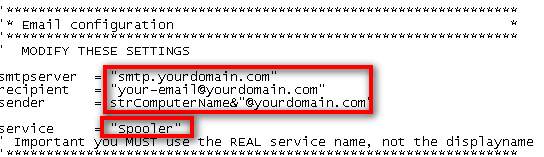
  • Modify this part of the script in notepad with your details (smtp server, email address etc)
    script1
  • Save the file to somewhere on the C drive (I usually use “c:\windows\schedule”)
  • Now enter “Computer management” (right click on My Computer and choose “Manage”)
    commanager
  • Select the service you wish to modify/monitor and double click it
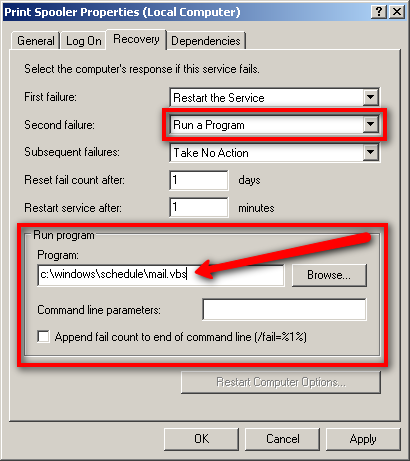
  • Modify the service as follows (you will need to modify this if you use another location for the script)
    run_a_program
    You will note that I set the script to run at the “second fail” not the first, you can set it to run at the “first fail” if you like – to avoid being bombarded I just choose first to be informed the second time a service fail.
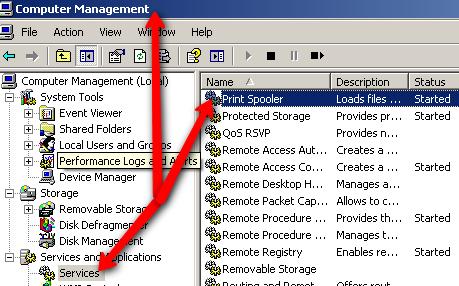
  • The service name (described in the script) is NOT the displayname, it is the REAL name of the service, you can find this here;
    servicename

And viola you are done, from now on you will get an E-Mail every time a service has failed twice (or the first time if you prefer)..  It’s all very basic but neat.

boxee

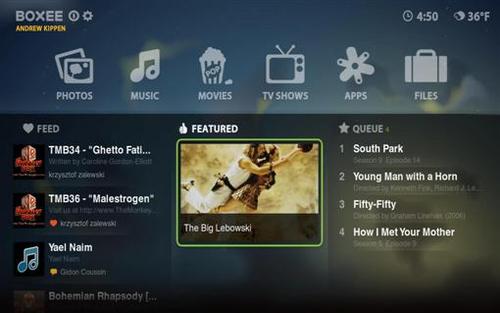
I somewhere read about this software a while ago called “Boxee”, it’s a new mediacenter software which can be downloaded for free from http://www.boxee.tv But with so much mediacenter software out there it got lost in the masses.  Anyway, recently I was reminded as D-Link is rattling their sable with the forthcoming release of the Boxee Box (well that is hardly going to be the name but still)..  It looks VERY interesting especially with a full qwerty keyboard being merged into the very neat remote that come with it, and it does seem somewhat more interesting than the WD Live TV (A LOT more apps/widgets) and a more finished design overall.

It does indeed look interesting.  Boxee seem to be based upon XBMC (X-Box Media Center) http://xbmc.org/download (which I btw still use on my old trusty X-Box 1 Classic)

Should you want to preview the experience you can download the free software for your pc/mac here http://www.boxee.tv/box

A few notes though;

  • The box is generally good at recognizing your video and music files (even series etc), BUT if it does not recognize the media file (it does so from the naming of the file) it wont show it :-/  thus you will need to rename it to a naming convention it understands which seem silly and acquad.  From what I can tell it will be getting the data (including photos) from IMDB.
  • I had some issues getting it to accept a share on a Windows 2003 server, I could ‘bypass’ this by mapping the share as a drive letter on my Win 7 machine where I ran Boxee but I am still puzzled as to why it did not seem to accept a simple Windows Share.
  • A further cause of concern is, what data is reported back to the producers of this software!?  Do they get the complete list of my music, video etc. archives?  Sadly I don’t know which concerns me as you have to register to run the software 😐

dlink1boxee-box-remote

A quick look at what formats it recognizes;

Video:

  • Adobe Flash 10.1
  • H.264  (MKV, MOV)
  • VC-1
  • WMV
  • MPEG-1
  • MPEG-2
  • MPEG-4
  • AVI
  • Xvid
  • Divx
  • PCM/LPCM
  • VOB

Lyd:

  • MP3
  • WMA
  • WAV
  • AIFF
  • FLAC
  • AAC
  • DTS
  • Dolby Digital
  • Ogg Vorbis

Billeder:

  • JPEG
  • TIFF
  • BMP
  • PNG

flashlogoSo if you want to be totally up-beat or perhaps are testing out Boxee then you will want to install the latest Adobe Flash Player (Boxee actually seem to require this), but no worries you can get it right here;

http://labs.adobe.com/downloads/flashplayer10.html

Among other things this version will add HW acceleration, neat for Netbooks as compatible GFX cards now can assist in playing video and thus perhaps adding HD playback to your otherwise slow Atom processor (however this DO require a compatible GFX card to work like the Nvidia ION and others).

Here is how to start and stop a service via WMI calls from a .vbs;

'Start Service
strServiceName = "Alerter"
Set objWMIService = GetObject("winmgmts:{impersonationLevel=impersonate}!\\.\root\cimv2")
Set colListOfServices = objWMIService.ExecQuery ("Select * from Win32_Service Where Name ='" & strServiceName & "'")
For Each objService in colListOfServices
    objService.StartService()
Next

'Stop Service
strServiceName = "Alerter"
Set objWMIService = GetObject("winmgmts:{impersonationLevel=impersonate}!\\.\root\cimv2")
Set colListOfServices = objWMIService.ExecQuery("Select * from Win32_Service Where Name ='" & strServiceName & "'")
For Each objService in colListOfServices
    objService.StopService()
Next

Delphi7If you are still creating Delphi 7 applications, then you may have had problems with UAC in Windows Vista, 7 and 2008, your application launches but is unable to eg. access the HKEY-LOCAL-MACHINE hive of the registry, what you need is to have the application launch with Administrative rights.

You could just rightclick on the application icon and choose “Run as administrator” however this is hardly professional for a program you distribute to others.

Well, it took a bit of Googling and a bit of experimenting, but here’s the recipe to creating UAC aware applications in Delphi 7.


  • First, create a new application and save the project.
    In the project directory you just created create 2 files;
    .
  • The first file “UAC.MANIFEST” should look like this;
    —————————————————————————–
    <?xml version=”1.0″ encoding=”UTF-8″ standalone=”yes”?>
    <assembly xmlns=”urn:schemas-microsoft-com:asm.v1″ manifestVersion=”1.0″>
    <assemblyIdentity version=”1.0.0.0″ processorArchitecture=”*” name=”UACAwareApplication” type=”win32″/>
    <trustInfo xmlns=”urn:schemas-microsoft-com:asm.v3″>
    <security>
    <requestedPrivileges>
    <requestedExecutionLevel level=”requireAdministrator”/>
    </requestedPrivileges>
    </security>
    </trustInfo>
    </assembly>
    —————————————————————————–
    .
  • Second file “vistaprog.rc” should look like this;
    —————————————————————————–
    1 24 uac.manifest
    —————————————————————————–
    (yes it’s only one line)
    .
  • Now you need to compile the “vistaprog.rc” file.
    you do this by running the “brcc32.exe” (found in the Delphi Bin directory) with this parameter “brcc32.exe vistaprog.rc“, this will compile a “vistaprog.res” file (this is a bit different/easier on Delphi 2007 etc, see links at the bottom for more details).
    .
  • Now you will need to modify your Delphi project.
    In the “unit1.pas” file find {$R *.dfm} and insert {$R ‘vistaprog.res’} just below it, save the project and compile it.

You application is now Vista/Windows 7/2008 UAC aware, you will also notice that a small shield is added to the application icon.

When you run your application it will look aimilar to this;

uac-unknown-publisher-prompt

Read more here;
http://www.zhou73.cn/index.php/article/zhou73/2009-02-18/195.html
http://www.zhou73.cn/index.php/article/zhou73/2009-02-18/196.html
http://ruminatedrumblings.blogspot.com/2008/03/vista-uac-manifest.html
http://www.experts-exchange.com/Programming/Languages/Pascal/Delphi/Q_22755023.html

alertbearI have for a long time been thinking about finding a good RSS reader, I have from time to time stumbled across some good sites with interesting content but the RSS reader in IE does not seem to be quite good enough.  I don’t want to have to go into a special pane of IE to view my feeds, I would like them to pop up by them self.

Anyway, so far I have found this Alertbear (not Alertbar as I first though, but bear as in the animal),  it is quite good – still missing a few customization options (I would like to be able to decide the update interval of EACH feed separately, but Alertbear only offers one update interval for ALL feeds).

thestackAlertbear come preset with a bunch of feeds, and you can add your own feeds quite easily.  Once you have added your feeds you can configure Alertbear to how often it checks for updates (sadly as mentioned only ONE interval, not one per feed) and what should be done once news are received (popup etc).  Mine is set to show headlines for 20sec upon receiving them.

There is also a ‘History’ function, this is more like a regular RSS feed reader but quite a good one (you get it by right clicking the tray icon and clicking “Show history”).

All in all it seem like something very close to what I have been looking for (about 94% of my needs are met I would say), there are some cosmetic and customization issues but they are minor. Anyway, if you know of a better alternative do tell..

.

You can quite easily make all USB devices on a machine ReadOnly by adding a key to registry, it is quite easy and painless.

Once the registry key is added and set you may have to wait a bit or eject and reinsert the device but then the device is ReadOnly.  ‘Unlocking’ the drive again is equally easy, you just set the key value to “0” (zero) and everything is back to normal..

Maybe even an ide for a prank on some of your friends 😉

Key to create;
HKEY_LOCAL_MACHINE\SYSTEM\CurrentControlSet\Control\StorageDevicePolicies\WriteProtect
Value DWORD; “1” = ReadOnly, “0” = Normal mode.

registryhack1