Just stumbled across a free util for advanced NTFS partition repair that I wanted to share, ít may just come in handy someday 🙂
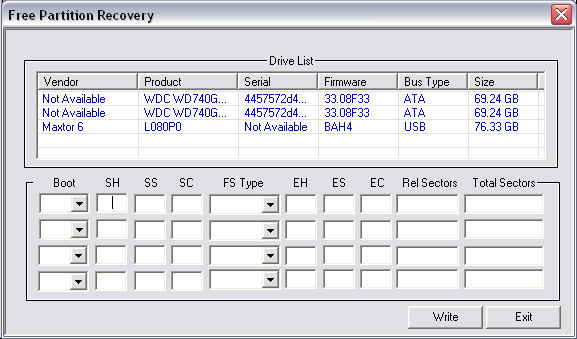
http://www.dtidata.com/resourcecenter/2008/01/25/free-ntfs-partition-repair-data-recovery-software/

Just stumbled across a free util for advanced NTFS partition repair that I wanted to share, ít may just come in handy someday 🙂
http://www.dtidata.com/resourcecenter/2008/01/25/free-ntfs-partition-repair-data-recovery-software/
 So you miss your old 80’s retro gaming device like “Donkey Kong” or what not? Well some crazy people have actually turned these into flash games, so now you can enjoy many of these old dreadful games on your pc 🙂 Nostalgic for sure but damn if I get how we could actually spend hours on these games during the 80’s.
Play here; http://www.pica-pic.com
I have twice seen this issue, you try to log on to a Windows 2003 server remote via RDP and get a black screen with black text – now you can still log on but you can’t read what you write on the logon screen.
The issue appear to be rather trivial to resolve, yet I am still puzzled as to what causes the issue in the first place. A colleague of mine Anuphol Urailat actually found a MS article on this http://support.microsoft.com/kb/906510/en
The problem is that the “Color” section under “Control Panel” in “.Default user” in the registry is set to “0 0 0” (Black) for everything, you simply export a clean “Color” section from another Windows 2003 box and viola everything is back to working condition. You can even do the import via Remote Registry edit, so it is rather trivial to resolve.
Before;

After fix;


So if you are looking into what to do during your vacation then here is a tip for you, you should buy and read; Zero Day by Mark Russinovich
Yes you may recognize the name from Sysinternals 🙂 he’s one of those clever guys from the good old sysinternals days. I have not read it yet, but as it come with high praises I have ordered my copy – it should be a VERY chilling factual Techno Thriller very well suited for people that like the details to be accurate.
Can be bought via Amazon.
I suddenly had the need to have a user send me some detailed info about his Windows 7 PC, and vaguely I recalled some utility that could make this as an export file you could send via email.
And sure enough this still exist under Windows 7 🙂
it’s called;
msinfo32.exe (yes its the same name for x64)
(just hit <left windows button> + <R> on the keyboard and launch <msinfo32.exe>).
You can export the data to a text file (do this instead of the binary file it can export – I have experinced that the binary file somehow get ‘damaged’ during email transfer).
For more info look here;
http://www.winvistaclub.com/f7.html
 Microsoft has released a no-nonsense simple to use, free and downloadable tool – Microsoft Security Scanner – to check and cleanup virus infections (or suspected infections).
This tool is not intended as an antivirus, it is intended as a cleanup utility for infected computers or as a tool you can download and do a double-check to confirm you are not infected (say your installed antivirus is unable to detect a certain virus/malware, then you can double check using Microsoft Security Scanner).
You can download it free from here (note the download only works for 10 days, then you have to re-download an updated version, this is to ensure the virus detection patterns are always fully up to date);
http://www.microsoft.com/security/scanner/en-us/default.aspx
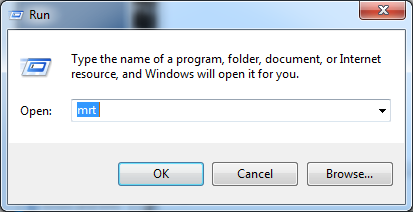
A good thing to also do is to run Microsoft Malicious Software Removal Tool from time to time – this is done automatically as part of Windows Update, however this is only the ‘fast/quick’ scan – by starting the MRT.EXE manually you can do a FULL scan. The Malicious Software Removal Tool is installed on all windows machines and updated/maintained via Windows Updates.
to run it;
Btw; McAfee has a similar yet not so comprehensive utility called Stinger (also free download);
http://www.mcafee.com/us/downloads/free-tools/stinger.aspx