The popular Avast antivirus went amok yesterday after a bug in a definition file, it started detecting hundreds of files as infected with Win32:Delf-MZG.
For cleanup instructions and explanation go here;
http://forum.avast.com/index.php?topic=51647

Various cool software and more
The popular Avast antivirus went amok yesterday after a bug in a definition file, it started detecting hundreds of files as infected with Win32:Delf-MZG.
For cleanup instructions and explanation go here;
http://forum.avast.com/index.php?topic=51647
It would seem OpenDNSwill be getting some competition in the DNS field, as would be expected it’s Google that is fiddling with a new DNS service “Google Public DNS“.. It will be interesting to see whatGoogle will be offering. As a side comment I can mention that OpenDNS has recently released a pay version of their free DNS service and added a few new services (antimalware etc) so you really should give it a spin if you have not already.
 When trying to get rid of a virus it often a good idea to scan using a boot CD, some viruses / rootkits bury themselves so deep that even the best antivirus cant detect them. Sadly very few CD’s are commercially available, and most often requires regular updates to always have the latest definitions.
A friend of mine Mr. Grøn, Torben pointed out that he had just stumbled across;
http://www.f-secure.com/linux-weblog/2009/09/22/rescue-cd-311/
Now this is interesting, F-Secure is an old player on the AV marked and usually makes good stuff, and it would appear this is no exception. It is a Linux boot CD that can scan NTFS partitions, and the clever part is that it actually downloads the latest definition files before it begin scanning – clever.. One minor “issue” though, it will rename file extensions to .virus if a file is infected, and this is also true for system files – thus you can ‘damage’ your windows installation and make it non bootable which can be a problem for novice users.
Other than that it offer some extra recovery utilities for pictures etc. Absolutely worth a look.
Update;
You may also want to give this a spin, I just learned about this;
http://trinityhome.org/Home/index.php?wpid=1&front_id=12
So you upgraded to Windows 7 but are as always having issues with Codec’s (A codec is the ‘decoder/encoder’ for a video or soundfile in a specific format eg. DivX or Xvid).
Under Windows Vista the Vista Codec pack seemed to work perfectly, but I was reluctant to install it on Windows 7 out of fear to create problems for H.264 (H.264 is now native to Windows 7, which was not the case for Windows Vista). However in the end I had to (too many things did not work without these codec’s), anyway it turned out that the Vista Codec Pack would not install on Windows 7, it cleverly detected that it was a new OS and pointed out that a new package was available here.
So all in all, my worries was laid to rest and I downloaded Windows 7 codec pack and everything was back to the old working state.
Do you need this codec pack? Well very likely not, most users can download the VLC player this player has build in most common codec’s and can thus play most video/snd files you get hold of, however if you need to do video conversion etc. then it is a different matter, Windows then need to be able to ‘understand’ the fileformat and this may ofthen require a codec. The rule should be, try VLC player, if its enough dont install anything more if not install the Windows 7 codec pack or Windows Vista Codec pack (also works for Windows XP).

A followup to a previous post; https://readmydamnblog.com/?p=674
Under Windows Vista and now Windows 7 I quite often experience problems with locked files, eg. I have worked with a file previously and now want to delete it just to be told that this is impossible as the file is in use, I have not found any explanations to this – my own guess is that it could have something to do with poorly written applications (that does not free files correctly) but this is pure guesswork.
Anyhow, it is very annoying to have to reboot the machine to be able to delete a file, and of cause this is often not necessary – Lockhunter to the rescue.. Lockhunter is a free utility to unlock these locked files, it works like this; you install lockhunter, right click on a locked file and selects “Unlock….”, you will go through a wizard to help unlock the file and viola problem solved you can delete the file.
My previous post on the subject regarded; Unlocker a similar tool, however Lockhunter seem a bit more informative (tell you what process is locking the file) and Lockhunter has a 64bit version.
Two links for you to check;
A neat service where you either upload a picture or reference it via a url and the page then display links to similar sites (with the same or almost the same picture).. Kind of fun for a few clicks or three.
A somewhat similar service but seem more like a community you join (I have not read the full description), tnx to Jesper T. for the latter.
Want to know more about the PC you are sitting at, eg what type of ram (in the lowest possible detail) is installed (important if you want to upgrade), well this free tool can do this; http://www.piriform.com/speccy
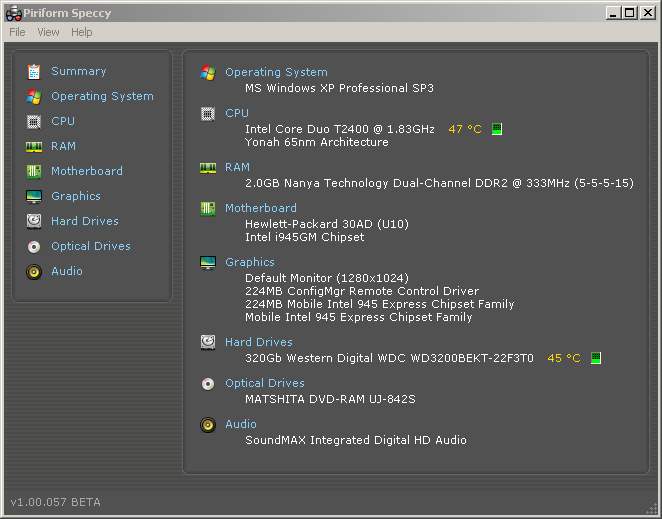
Also you should check out their other utilities, they are equally great..
be sure also to check out;
http://www.alexnolan.net/software/
where System Spec also is among the more useful hardware inventory programs, but there’s also a bunch of other useful utilities there.
.
From Panda’s Cloud Antivirus blog

First of many thanks to the millions of beta testers and specifically to those who have given us feedback and helped improve the product. We think we have fixed all the issues you have reported.
If you have any of the previous versions installed (Beta1, Beta2 or Beta3) do the following:
1- Uninstall your current version.
2- Reboot your computer.
3- Download version 1.0 from http://www.cloudantivirus.com and install.
4- If you already have an account from Beta3, you can use the same one. Otherwise the installer will prompt you to create a Cloud Antivirus account.
As a reminder, don’t forget to use the Panda Cloud Antivirus Technical Support Forum for posting any issues you might experience.
Thanks again for helping us create this great free antivirus !!!
Want to try something else than IIS, Apache on a Windows platform? Lighttpd may be worth a look 🙂
I actually stumbled across lighttpd when I was installing applications on my jailbroken Ipod touch, and it looked interesting…
I found a blogpost with getting started instructions;
http://www.winstonyw.com/2008/05/28/installing-lighttpd-and-php-on-windows/
I did not quite get PHP working just yet nor did I find out how to start the http server as a service, but there are tricks to running an app as a service so this should not be a showstopper.
How secure is it? Well take a look here for advisories; http://secunia.com/advisories/search/?search=lighttpd
And now with no further delay here is the getting started guide (taken from the blog previously mentioned) with my comments; Read more
 Having problems remembering those damn passwords?
Well there are tons of password managers out there, so how is this one different? Well it is cloud based and that gives you the advantage that your passwords are also stored in the cloud (encrypted of cause), so if you need them on a different machine or you reinstall – yep you guessed your passwords are still there.
Features like browser integration etc. is still there so that is pretty regular.
I have not yet tried this, but it sounds neat.
Two good alternatives (not cloud based) are;
http://passwordsafe.sourceforge.net/
http://keepass.info/