Various cool software and more

winmd5_screenshotSome times you download large files and you might want to verify the integrity of the file, or it could be that you are the distrustful type and simply want to verify the file integrity just because you can!?
MD5 is an older check-summing algorithm, basically you put data through this algorithm and it spits out a long check-sum – change as much as a comma in the file or text and the check-sum changes.  MD5 is no longer considered ‘safe’ as some vulnerabilities have been discovered, however it would still be complicated to ‘fake’ the right check-sum for a file – so for something as trivial as file check-summing I would consider MD5 safe enough – then again it depends what are you looking for corruption errors or deliberate attempts of tampering (for the latter you should perhaps go with SHA1 instead).

Fine, so you got the MD5 check-sum (eg. 73f48840b60ab6da68b03acd322445ee) from the website, how do you compare it to the file you just downloaded?

Well I found this util which is free and fairly easy to use.
http://www.winmd5.com/?rid=winmd5

Direct Download

I just had the pleasure of fixing a computer with an update problem, it would not install KB936181 no matter what was done..

I found this guide on some page;

How to fix the KB936181 Windows Update problem:
Click Start -> Run, type cmd and click OK
  1. Type ren %windir%\System32\msxml4.dll msxml4.old, and press Enter
    (Ignore any errors stating that the file could not be found)!
    Next, type exit, and press Enter
  2. Now, simply visit the official Microsoft KB93618 download
    link and manually download and install the update
  3. Restart your computer and if all goes well, your
    KB936181 update issues should be history.

 This sounded quite sane, so I decided to try it…  However after renaming the file I tried to run the update and got the three options 1) Modify 2) Repair 3) Remove, and I decided to go for the remove option, after this I reran the advertisement from the update server (SCCM WSUS) and viola it installed without a glitch.

As the user said, what a stupid update 😀  I could not agree more..

Microsoft-Security-EssentialsThe long awaited “Microsoft Security Essentials” is released 🙂  and as the beta looked promising and the company I work for has been using “Forefront Client Security” (the corporate version) for a year now, I was looking forward to trying this out…
I fired up my browser and went to “http://www.microsoft.com/security_essentials/“, however as I live in Denmark I was met by this message;

Not available in your country or region
You appear to be in a country or region where
Microsoft Security Essentials is not available.
Thank you for your interest in Microsoft Security Essentials.

Shown in 9 languages (of cause not in Danish), well bummer…   However as I have access to a US proxy I just changed the proxy settings and things brightened up 🙂  So I am now the happy ‘owner’ of “Microsoft Security Essentials”, the thing about this is it’s free 😀

Should you want to check this product out, just direct your browser to; http://www.microsoft.com/security_essentials/

And should you get the same annoying message stating that it is ‘Not available in your country’, then you might want to take a look at; www.torproject.org  TorProject is mostly an anonymity solution that allows you to browse without being tracked by IP etc, however they also offer the possibility to select which breakout/proxy you wish to use, and here you can select a US breakout and you can fool the MS server into letting you download all the same – you may also need to modify your IE settings to show a US regional code etc. but it should all be possible..

Want more details and maybe a review?
Visit here; http://www.winsupersite.com/win7/mse.asp

Enjoy.

Update!
You may be able to download MSE from here even if you are not in the US 🙂

I really got a kick out of this;

http://web.archive.org/collections/web.html

Here you will have the opportunity to see how websites looked in the past, it was funny looking at some of my old websites and reliving how they looked 🙂  Nostalgia.

Every now and again you tend to forget which keyboard combination it was you had to press in order to minimize a window or what ever clever thing you need to do, this is especially a nuisance if your mouse somehow is not working.

Well Microsoft kindly enough has a page listing the shortcuts for you;
http://support.microsoft.com/kb/126449/en-us

or click more for a transcript here…

Read more

Have you ever tried enabling Shadow Copy on a server drive?  Shadow Copy (in this “Shared folders” variant) is a poor man’s backup/version control, it will allow you to restore previous versions of files deleted via shares.

Technical info on how it works;
http://technet.microsoft.com/en-us/library/cc785914(WS.10).aspx

A more lo tech approach here (visual demo);
http://www.microsoft.com/windowsserver2003/docs/ShadowCopiesSharedFolders.swf
http://www.microsoft.com/windowsserver2003/techinfo/overview/scr.mspx

shadowcopy2

Image1

Anyhow, once implemented Shadow Copy will begin to “backup” data via a Scheduled Job if you so choose (the scheduled job is added to the scheduled tasks in the control panel automatically). 

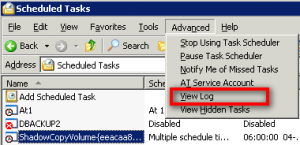
However, when I looked in the logfile for scheduled jobs (see image1) there was mention of an error (which is odd as the schedule is created by the system and as such should be correct);

 .

"ShadowCopyVolume{eeacaa88-d521-11da-a3c1-00170859ede5}.job" (vssadmin.exe)
31-08-2009 12:00:00 ** WARNING **  Invalid working directory..
The specific error is:  0x00000003: The system cannot find the path specified.

Now this was odd because the Shadow Copy backup worked without a glitch and files could be restored, so why the error!?  Well a bit of digging around brought me a step closer to the truth, but sadly not all the way (I now know how to fix it, but not why the errormessage appears).. 

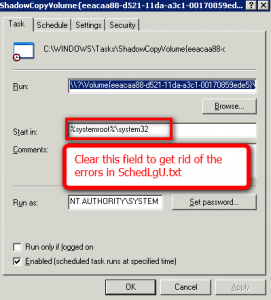
It would appear that the error is related to the “Working directory” in the scheduled task, and the suggestion was to clear the “Working directory” field in the scheduled job – does it make sense? well not really, working directory pointed at “%systemroot%\system32” which equals “C:\windows\system32” and this folder DO exist but never the less it did the trick – no more errors in the SchedLgU.txt file.

shadowcopy1So the task is easy, simply delete the folder “working folder” in the scheduled job, normally called “ShadowCopyVolume{……….” and the errors are gone.  Is this really nessesary?  Nope, not at all it’s purely cosmetic, the job works even with the error message, so it’s only if you get annoyed by error messages in you log files.


.

dc1zoomStumbled across this pice of software “Duplicate Cleaner“, a utility to remove duplicate files on you harddisk – a growing problem with the harddisk sizes these days, I guess I alone havearound 4TB disk storage and I would be VERY surprised if there was not a duplicate file or two.  The software also supports hardlinks which sounds interesting.

I will be testing this software in the near future.

Screenshots here;
http://www.digitalvolcano.co.uk/content/duplicate-cleaner/screenshots

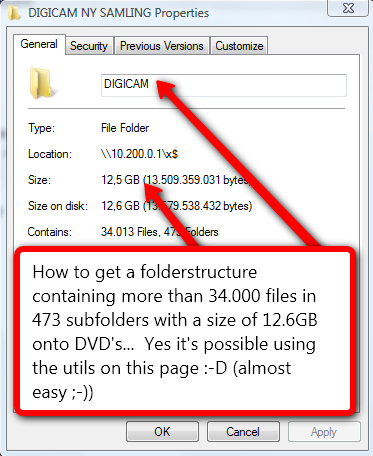
2009-08-28_2308Have you ever tried to burn your collection of digital photos or mp3 files to DVD?  Sure you have, how did you accomplish it?  By sorting files into groups of 4.6gb and burning one dvd at the time?  Most people do it this way, you could also use winrar or other and create compressed files with a size of 4.6gb (one per dvd) – however that is not optimal if you later wish to extract just that ONE file you deleted by accident or if one DVD gets corrupted…

What to do!?  Well I stumbled across this blog post;
http://www.jonnysblog.com/2009/04/12/how-to-split-directories-to-span-dvd%E2%80%99s/

Where several utilities are mentioned;
SizeMove (see above link for screenshot)
SizeMe

I also stumbled across;
LargeBackup2DVD (a full featured backup solution)

UPDATE;
A related product Dirsplit has come to my attention, this appear to be more related to sorting than size, but may still be interesting to you;
http://code.google.com/p/dirsplit/

gpartedNeed to repartition your harddisk?  Don’t want to pay hundreds of dollars for Partition Magic?

Well you may be in luck by visiting;
http://gparted.sourceforge.net/

Here you will find a linux iso of a utility called Gparted, maybe its worth a look before you order Partition Magic 🙂

yubikeySo I just received my YubiKey II in the mail yesterday, it’s quite nice not as pretty as the original YubiKey but way more robust.

What is a Yubikey you ask, well that is complicated to explain, but basically it’s a token that will generate one time passwords – you can hence use it to login to websites and services (that of cause need to support the Yubikey), the cool thing here is that with “One time passwords” you do not need to fear that someone steals your password (malware, virus or keylogger) as you get a new password every time you use the key to login..

It’s way cool, and quite easy to implement on your own website or in your own software as there are numerous public API’s available..

The company behind and their description of the key
http://www.yubico.com
http://www.yubico.com/products/description/

Various videos on the Yubikey
http://www.youtube.com/results?search_query=yubikey&search_type=&aq=f

A technical walk through of the Yubikey
Security Now – Episode #143 – 08 May 2008 – 84 min.
http://media.grc.com/sn/sn-143-lq.mp3

Developers look here
http://www.yubico.com/developers/clients/

Update; 2010 January
Coupon/discount code available here;
http://www.ghacks.net/2010/01/12/yubico-usb-key-provides-extra-login-protection-security/