When I first installed Windows Vista I was annoyed with the changes to the search ability of Windows, this experience did not improve under Windows 7 quite to the opposite actually.. The thing is, if you allow indexing of your drives searching is bearable – however if you like me have several terrabytes of data then Windows will never stop indexing, and the constant ‘ticking’ of the harddrive was driving me insane.
For a long time I decided to just live the very basic search ability in Windows 7/vista, it is quite possible to search for filenames and extentions – however the other day I really needed the ability to search for files containing a special text string – something that is impossible if you have turned indexing off (as far as I have been able to figure out). So after googling the subject I found several different utilities that could remedy this, however most at a price of around $25, now normally I don’t mind paying for something useful however as I use this quite seldom I decided to keep googling 🙂
And I am pleased to announce that not only did I find something free it is awesome 😀
https://readmydamnblog.com/wp-content/uploads/2015/02/toplogo4.png00Mikehttps://readmydamnblog.com/wp-content/uploads/2015/02/toplogo4.pngMike2012-03-05 09:30:252012-03-05 09:30:25Search and you shall find – Windows 7 search improved 10 fold
Do you for some reason need to keep track of your time?
Let’s say you work in a helpdesk and need to keep track of what you spend your time on, or perhaps you are an independent consultant and need to register when you use time on clients. There is a lot of reasons why you may need this.
Anyway here is a very cool free utility to assist you in doing just this, it is very easy and intuitive to use and implement.
https://readmydamnblog.com/wp-content/uploads/2015/02/toplogo4.png00Mikehttps://readmydamnblog.com/wp-content/uploads/2015/02/toplogo4.pngMike2012-02-23 00:11:082012-02-23 00:11:08Time registration / Time management / Time tracking with Grindstone
If you have the need to download HP drivers, especially for more than one model or for both 32/64 bit then this utility is something for you.
This utility allow you to download drivers for any number of models at the same time without needing to visit the HP web-site which can be a bit of a hassle if you need to visit each model page.
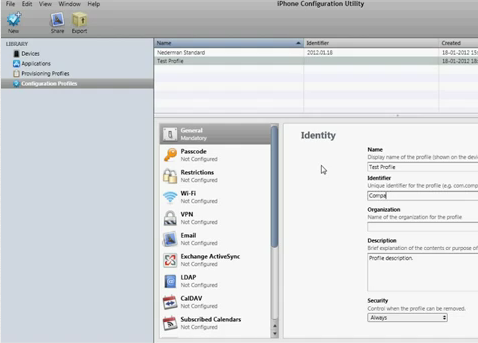
You may be an IT administrator or just the person in charge of helping your users (or friends for that matter) configuring iPhones. Now setting up an iPhone is not hard once you have tried it once or twice, but it is still time consuming and lets face it not very fun, well imagine that you had a piece of software in which you could prepare the configuration and then just sms the configuration to anyone? Well it is almost as easy as that 🙂 and best of all, I will show you how 😀
Now you install this and are set to go, with this software you can create configurations for the iPhone (or iPad) and by connecting the device to your machine you can transfer the settings directly, this is easy enough but as mentioned you can do even better – you can send the configuration over the internet – the latter however require a web-server and maybe a little more skill that the average home user.
Anyhow, if you are an IT administrator etc. and need to setup a log of iPhones, then this is interesting for you.. You create a configuration with “iPhone configuration utility” and upload this to a web-server, eg. as http://www.webserver.com/iphonesettings.mobileconfig and now you can just sms the link to this page/file to new employees or BOD “bring your own device” users. Now one word of caution though, if you publish your config this way you MUST omit ANY sensitive information like email, domain name, username and passwords, this however is not a problem – any information not entered will just be prompted – so if you omit the username and password the user will just be prompted for this when installing the configuration (information like this is likely known by the user, or could be included in the sms). That some outside user may be able to read what mailserver you use is not really a problem, this information is already public knowledge via eg. NSLOOKUP – so there is really no security issue with this unless you include passwords etc. which you should avoid as mentioned.
The settings set this way are entered into the phone as a “Profile”, you can configure that this “Profile” can be removed “Anytime”, “Via Password” or “Never” (never mean that you need to reset the device to remove), if you remove the “Profile” it will also remove all data related to the profile (eg. if email settings was part of a profile, it will also remove the emails as part of the removal – but if you setup additional email’s manually these will be left alone).
What can you configure;
Almost anything, just to mention a few things; Email, VPN, WiFi, Policies (you can enforce password etc. etc.).
See my walktrough here for more details etc;
Ps.
If you upload the configuration to a webserver, you may need to set the mime type and remember to NOT change the extention of the file (.mobileconfig).
Found an interesting mention on the Microsoft Lync client for iPhone (Lync is more or less a corporate version of the MSN-Messenger).
Sadly it won’t work on my iPhone as I have jailbroken mine and is FAR behind in iOS version 🙁 but then again, if I were to install this I would propable get IM’s from work all the time so guess I can live with it 😉
Microsoft Lync 2010 for iPhone requires a Lync Server or Office365/Lync Online account and will not work without it. If you are unsure about your account status, please contact your IT department.
I suddenly had the need to have a user send me some detailed info about his Windows 7 PC, and vaguely I recalled some utility that could make this as an export file you could send via email.
And sure enough this still exist under Windows 7 🙂
it’s called;
msinfo32.exe (yes its the same name for x64)
(just hit <left windows button> + <R> on the keyboard and launch <msinfo32.exe>).
You can export the data to a text file (do this instead of the binary file it can export – I have experinced that the binary file somehow get ‘damaged’ during email transfer).
https://readmydamnblog.com/wp-content/uploads/2015/02/toplogo4.png00Mikehttps://readmydamnblog.com/wp-content/uploads/2015/02/toplogo4.pngMike2011-05-05 18:30:292011-05-04 15:36:04Systeminfo – now how was it….
This is clever, I don’t need it and can’t see that I ever will – but it’s still clever..
You may have heard about technologies like JBOD (Just a bunch of disks)which allow you to link a bunch of harddrives you have into one driveletter. The upside is that you can ‘reuse’ those old drives you have lying around (normal RAID configurations require that disks be of the same size as a minimum), the downside is that there is NO redundancy/security in JBOD.
Drive Bender is similar to JBOD, it will allow you to link together free diskspace from a bunch of different drives into one single volume. One thing that is slightly different and potentially clever is that the technology is “non-intrusive” meaning that it will not destroy the existing filesystem (NTFS) – it will simply store it’s files on the existing filesystem (as I understand the technology), you should even be able to access files on the disks without going through Drive Bender.
As mentioned I can’t think of a sittuation where I personally would need this, that however does not make it less clever 😀
Right now it’s in a beta state and by invite only, so you’ll have to sign up for the next beta round.
Pricing is not revealed, one could hope it would be free 🙂
Have you ever seen those warnings from your browser “The HTTPS content you are…..” stating that the page you are loading contain both HTTP and HTTPS? The answer is most likely yes, sure you can disable these warnings (which due to their frequency may even be necessary) but for the sake of security or even just curiosity you may wish to know just what it is on the webpage that is HTTP and not HTTPS (often it’s simply an image, however if it should prove to be a java-script it might be a good reason for a raised eyebrow). Anyhow, how do you get this information? Well I found a mention of something called HTTP Watch in a forum somewhere (can’t remember where sorry), this is an add-on to IE/Firefox that will allow you to see what’s going on when loading a web-site, simply install – rightclick on the web-site and choose HTTP Watch – record and re-load/load the page and get the complete list of objects loaded..
Cool, and better still the Free version is quite sufficient 😀
https://readmydamnblog.com/wp-content/uploads/2015/02/toplogo4.png00Mikehttps://readmydamnblog.com/wp-content/uploads/2015/02/toplogo4.pngMike2011-03-19 15:36:182011-03-19 15:36:18HTTP watch – see what’s going on
Update;
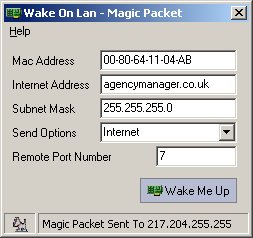
I have “installed” and tested this, but so far sadly without luck :-/ I will hopefully have time to do some more digging in the near future, but I am a bit sceptic, when the PC is off it does not have an IP!? It may work if you have an ADSL modem but with a router I can’t really see how it would work.
https://readmydamnblog.com/wp-content/uploads/2015/02/toplogo4.png00Mikehttps://readmydamnblog.com/wp-content/uploads/2015/02/toplogo4.pngMike2011-03-13 23:39:352011-03-16 22:00:33WOL over the Internet