Do you often upload your photos to Facebook?  You may well know that although it is not overly complicated it is time consuming, well at least it used to be 🙂  here is a utility that will help you to quickly upload your photos to Facebook – ain’t the world a wonderful place 🙂

The utility offers to;
Create new categories
Re-size photos
Upload single or multiple photos

Read all about it here;
http://www.ghacks.net/2010/11/17/easy-photo-uploader-for-facebook/

Download it here;
http://www.brainfight.com/facebook/wall/index.php

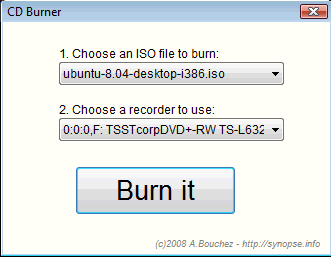
Have you ever had to explain to a non IT person how to burn an ISO image? It can be a challenge, and understandably so – if you don’t understand the fact that an ISO file is not just a regular file then it does not make much sense..

Anyhow, here is a good tip for you;

Download ISOCDBURNER from this site;
http://bouchez.info/cdburner.html

It is almost fool proof 🙂  Only thing to note is that the program file need to be in the same directory as the .ISO file, but other than that nothing can go wrong 🙂  even your aunt, mother or sister can do this 🙂

Need a few more features but still a fairly foolproof software, take a look at this;

http://www.isoimageburner.com/

Have you some old MS-Dos program lying around that you for some reason wish you could run, but as you installed Windows 7 64bit this is not possible!?

Well then this is for you, DOSbox is a free dos emulator that does a REALLY good job of executing these old apps.  It will even emulate a SoundBlaster Pro soundcard so you will be able to get sound and all.  So if you have Monkey Island I lying around somewhere now is your chance to get all nostalgic 🙂  Oh yeah, it is as with so many other cool things FREE 😀

http://www.dosbox.com/download.php?main=1

Watch how it can even run old DOS demos;

On the subject of ISO files (previous post), if you have downloaded a bootable ISO file and want to do a quick preview of it – then try MobaLiveCD.

MobaLiveCD is a quite simple little utility that will provide an instant emulation of a system, thus you start MobaLiveCD and tell it to ‘boot’ the ISO file of your choice and BAM without any fuss you will see the menu of this CD/DVD.  Really cool.  Ok, one minor issue with this is that the speed of the thing is not great, for starting small menu driven cd’s/dvd’s it’s great but for starting a Linux live cd it is hopeless – so I guess it’s more a tool to quickly see what’s on a cd/dvd than a virtual pc kind of thing – but hey it is free.

http://www.youtube.com/watch?v=Uwwdv9TJah0
Available in HD


http://mobalivecd-en.mobatek.net/index.php

Once in a while you get hold of an ISO file (an ISO file is basically just an image of a CD/DVD/BLUE-RAY disk) and need to access the content of this file, there are several ways of doing this;

1) You can burn the ISO file to a media and read it this way.

2) You can extract the ISO file to a folder using a utility (WinRar is very good at this).

3) you can mount the ISO file as a virtual CD/DVD eg. use Deamon tools lite.

I would suggest option 2 or 3.

Anyhow, David Davis has written a nice beginners guide on the subject, so be sure to check it out at;
http://www.windowsnetworking.com/articles_tutorials/Mounting-ISOs-Windows-7-Free-Tools.html

As you may have read I jumped on the Android wagon earlier, it’s a cool phone not quite as stylish as the iPhone but a LOT cheaper and more open.

One annoying thing however is, that applications ALL seem to require obscure access to run – access to geolocation, access to sim card, access to contacts, access to sd card, access to make phonecalls and full access to internet… and it’s not as on the iPhone where you are asked if this is ok, no once you install the software you are informed about the rights the software wants and you then have two options install or not..  strange and annoying, why can’t I select what I want to give access to?

Anyhow, what we need is a firewall for the device, and someone has been kind enough to make one Droidwall 😀  sadly it requires root access 🙁
http://www.appbrain.com/app/droidwall-%28root-required%29/com.googlecode.droidwall

Ever had problems ejecting a USB device – getting an errror like “Unable to stop….”?

Well this page claim to have a utility that can assist you with this issue plus a whole lot more (like renaming USB devices, ejecting USB via command line and hot-key eject)… Sounds very promising..

http://safelyremove.com

I found this by visiting an old post here on my site, a post about a file unlocking utility.

Now this fall under the category, easy solutions to complex problems…

I recently had to remove about 150 computer objects from a MOM 2005 console, it was not possible to select all and choose remove so you had to right click each and every one of them – click “remove” and then answer “Yes” to the “Are you sure….” dialog…  Now imagine how long this would take to do manually!?  Well you could probably do some scripting that would solve the problem – however that would require some research to find, test and then implement..  but then it struck me, a flashback from back in Windows 3.1 where you had a macro recorder, this macro recorder would allow you to record keyboard and mouse actions and then play it back as many times as you would like (I remember making a macro sending emails and thus spamming some of my fellow students, great fun at the time), now someone must have made a freeware tool that will do this under modern versions of Windows, and sure enough – “Do it again” to the rescue…  “Do it Again” will allow you to make macros and play them back as many times as you’d like, it’s free and easy to use..

1. Get the util from here; http://www.spacetornado.com/DoItAgain/

2. Install it

3. Start “Do it again” and click “create new task” and perform the task you want repeated.

4. Press “Scroll lock” (the button) once you are done with your task.

5. Name the macro in “Do it again” (a dialog box will pop up).

6. Under options set the number of times you want the task to repeat

7. Double click the macro you just created

8. Sit back in amazement and watch someone else making all the hard work for you, now it will still take time but you can sit back and drink coffee while it does.. NICE..  a simple solution to a time consuming problem…

UPDATE;
Sadly I found out this does NOT work on Vista/Win7 🙁 – bummer, however I guess there will be some other util out there that will…

UPDATE2;
I just found a util  “Windows Macro Recorder” that claims to work on all windows versions, same concept as the above;
http://www.freelabs.info/MacroRecorder.aspx

http://www.sparkleshare.org/ is a new project on the Internet inspired by Dropbox (a clever fileshareing/collaboration and file syncronising util that uses cloud based storage), SparkleShares force is that it supposodly will be free/open source and you can thus setup your own servers, sounds like something to make a mantal note of..

The first version will be in Linux but should be followed by a windows version, presently no version is publicly available though (as it’s very early in the program, announced June 10th 2010).

http://www.omgubuntu.co.uk/2010/06/sparkleshare-aims-to-better-dropbox.html