Do you have a temporary directory on your pc/server, you know one of those places where you put stuff to look at later but always forget to delete again? It is likely that your answer is yes, but the more important question ought to be how do I automate cleanup of this directory?
There are numerous ways to do this, but I’ll just give you one here – google the rest if you are not satisfied..
It’s actually not as hard as it sound, you need to download a utility called “forfiles.exe” (put it in c:\windows\system32 or similar) and then create a script much like this (here I presume the directory to cleanup is C:\tempdata);
rem Delete files on the server older than 14 days.
forfiles -p c:\tempdata-s -d -14 -c "cmd /c del /Q /F ""@FILE"""
or
rem Delete files older than 90 days
forfiles -p c:\tempdata-s -d -90 -c "cmd /c del /Q /F ""@FILE"""
And that is about it 🙂
 If you have ever worked with .MSI files you must have touched Microsoft’s utility ORCA. Well it proves there is an alternative to this with a few extra features Super ORCA, so if you ever mess with .MSI files you may want to give Super ORCA a spin at
  I have for a long time been thinking about finding a good RSS reader, I have from time to time stumbled across some good sites with interesting content but the RSS reader in IE does not seem to be quite good enough. I don’t want to have to go into a special pane of IE to view my feeds, I would like them to pop up by them self.
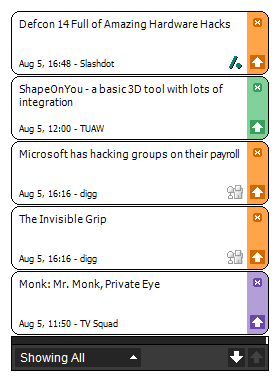 Alertbear come preset with a bunch of feeds, and you can add your own feeds quite easily. Once you have added your feeds you can configure Alertbear to how often it checks for updates (sadly as mentioned only ONE interval, not one per feed) and what should be done once news are received (popup etc). Mine is set to show headlines for 20sec upon receiving them.
 So I am looking for a s.m.a.r.t utility to monitor the health of my harddisks..
 So, as I have mentioned before you can use the
  and Windows 7 seem to spend a lot of time working on your harddisks without no apparent reason, and it is very hard determining what process it is that is actually causing all the disk/processor activity. Well one way of debugging this is to download
  Ever so often (or in my case ever so seldom) you need a TFTP server for some equipment that need updating (firmware etc), and as I do so seldom I keep forgetting whitch software I need for this.