 If you once in a while work with installing software, then you HAVE to check this out.
http://www.autoitscript.com/autoit3/scite
It is a scripting language that will make it very easy to install and modify installed software installations, it uses a very intuitive VB variant that is very easy to understand and the help is just wonderful. One of the VERY neat features is that once you have completed your install script you simply compile it and viola you have an .exe file, thus you can simply add an install.exe file to the package you wish to distribute and the enduser do not need to have any scripting engine etc. installed, it IS neat..
So you might think, “well if its a VB vaiant, why not just make the whole thing as a VB-Script” – well you could – but have you ever tried to access files/registry etc via a VB script, well sure it is possible but the code quickly become unnessesary complex, this scripting language is straight out of the bag – copyfile( from, to) as easy as that.
The scripting engine has support for;
System variabels (eg. @StartMenu = location of startmenu, @StartMenuCommonDir = location of All users start menu etc etc.)
File management (copy / delete / move files)
Directory management (copy / delete / move directories)
Registry access (read write)
Replay keystrokes
and a whole lot more..
This is from the introduction in the help file;
Easy to learn BASIC-like syntax
Simulate keystrokes and mouse movements
Manipulate windows and processes
Interact with all standard windows controls
Scripts can be compiled into standalone executables
Create Graphical User Interfaces (GUIs)
COM support
Regular expressions
Directly call external DLL and Windows API functions
Scriptable RunAs functions
Detailed helpfile and large community-based support forums
Compatible with Windows 95 / 98 / ME / NT4 / 2000 / XP / 2003 / Vista / 2008
Unicode and x64 support
Digitally signed for peace of mind
Works with Windows Vista’s User Account Control (UAC)
Inspiration;
If you are interested I have created an uninstall script for McAfee Virus Scan and ePO agent,
you can download it here for inspiration;
https://readmydamnblog.com/downloads/McAfee_Uninstall.au3
or the compiled EXE version here
https://readmydamnblog.com/downloads/McAfee_Uninstall.exe
For more on uninstalling McAfee Virus Scan and ePO please see https://readmydamnblog.com/?p=147

 Imagine this, you just bought a new netbook and even with a completely newly installed system you experience that it takes 3-5 minutes to start the pc (where it should only take 1-2 minutes), so what went wrong!?
 Some times you download large files and you might want to verify the integrity of the file, or it could be that you are the distrustful type and simply want to verify the file integrity just because you can!?
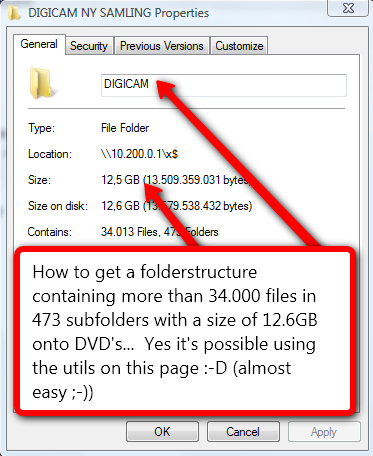 Have you ever tried to burn your collection of digital photos or mp3 files to DVD? Sure you have, how did you accomplish it? By sorting files into groups of 4.6gb and burning one dvd at the time? Most people do it this way, you could also use winrar or other and create compressed files with a size of 4.6gb (one per dvd) – however that is not optimal if you later wish to extract just that ONE file you deleted by accident or if one DVD gets corrupted…
 Need to repartition your harddisk? Don’t want to pay hundreds of dollars for Partition Magic?
 Nero has released a FREE limited version of their popular CD/DVD burner software.
 If you have a bunch of Audiobooks lying around and want to use them on your Ipdo/Iphone then it’s an advantage to convert them to .M4B files (then your device will remember where you left off the last time you listened, and not as .MP3 where you have to use the slider to get to where you were)..