Various cool software and more

screen9

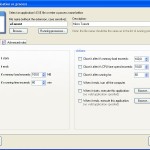
Now this seem fairly cool, a utility that will allow you to monitor running applications, take action upon conditions met and give you great statistics.  All in all it looks promising enough.  I will hopefully be giving it a spinn shortly.

Get it here; http://www.drinkprog.com/kiwi/

And yes sure enough, nothing super good is free and hence you seem to have to pay for the advanced features, but lets first see if its worth the money 😉

note;
I just did a quick install on a virtual pc and I am a bit disappointed, both the layout of the software and the timers in it seem to be off.  Could be that its because of the virtual environment but….

So if you have a PHP driven web hotel and want to create a simple browsing system for your files there (lets say you got a directory with subfolders and files etc that users need to browse around in), well take a look at TotalIndex it looks simple enough and furthermore its free 😀 nice..

Forfiles -p c:ackup -s -m *.* -d -5 -c “cmd /c del /q @path”

This will delete all files in my backup directory older than 5 days. To test it first, use this:

Forfiles -p c:ackup -s -m *.* -d -5 -c “Cmd /C Echo 0x22@Path@File0x22”

Workarounds for XP users might be;
http://windowsitpro.com/article/articleid/71600/jsi-tip-0274—delete-files-older-than-xx-days.html (but this require additional software to be ‘installed’).

Hmm the below seem to be some unix variant, but maybe something similar is possible in Windows.

http://lifehacker.com/software/command-line/cli-fun–delete-files-older-than-x-days-239124.php (seem cool)
find /path/to/files* -mtime +5 -exec rm {} ;
http://lifehacker.com/software/geek-to-live/geek-to-live-hard-drive-janitor-133190.php (the deluxe edition)

en_virustotal-uploaderYou may recall me mentioning Virus Total, this is a priceless service that allow you to upload a file and have it checked by many different antivirus engines within seconds. Excellent if you are suspicious about a file, or just if you want to be sure that the file you just downloaded is clean.
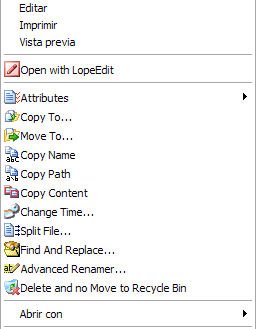
Well I did not mention another neat feature from Virus Total, a “send to” addition to Windows right click options. Once this is installed you can right click on ANY file and have it uploaded to Virus Total for analysis easy and painless.

VirusTotal Uploader

menuJust stumbled over this tool, it seem to be very practical (sure its not rocket science, but its easy and convenient) 😉

Now you can customize the context menus of Windows Explorer to add your own functionality and not only is it easy, its free as well 😀

http://www.lopesoft.com/en/index.html

.

skypeSo you are a network administrator and are concerned about Skype (supernodes and all), well take a swing around https://www.cs.uwaterloo.ca/twiki/view/CF/SkypeConfiguration here you will find links to some very interesting Skype disections and tips on how to prevent becomming a supernode.

Be sure to read the text from Blackhat 2006;
https://www.blackhat.com/presentations/bh-europe-06/bh-eu-06-biondi/bh-eu-06-biondi-up.pdf

spammJust a quick reminder to myself (and other interested), if you need to sign up for something (eg. you have to provide a valid email to recieve a download link, etc etc), then I have been using;
www.mailexpire.com

and this service seem to do a fairly good job.

It work like this;

  • Connect to www.mailexpire.com
  • Provide your current email, and select how long your temporary email should be valid for hours to 3 months. I would suggest at least a week or so (you can cancle it immideately at any time).
  • Accept the activation mail you get from them (in this mail you will also find your temporary email)

You are done, now simply use the mail you got in the activation mail to get those download links etc.  Its simple, safe and free 😀

sms2 Bit of an oldie here, and still untested with newer GSM Phones, however should you want to have SMS capability in your organization this may be a cheap way to go.

It requires a compatible phone (and cable) and then you can fire off scripts (or commandlines) to send sms messages.  Seem easy enough, but sadly I don’t have a data cable to the old Nokia phone in our storage room 🙁

Do let me know if you try it and it works 🙂


http://www.microsoft.com/globaldev/outreach/dnloads/smssender.mspx

SMSSender.msi

Update:
I finnally had the chance to test this (I had no data cable for my cell phone), anyway it is all very straight forward until you try to send an sms from command line, this will fail with a message like this “there is no device previously used by SMS sender…….”.

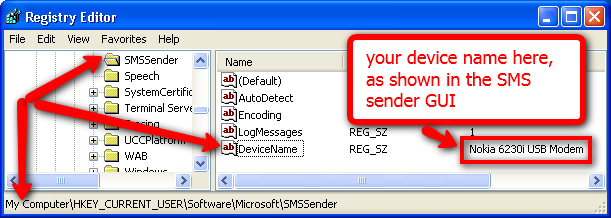
Unfortunately the SMS sender software has a bug that causes it NOT to write your choice from the GUI to registry :-(,  so you need to enter the device name manually to registry.

smsreg


The keyname is;
HKEY_CURRENT_USER\Software\Microsoft\SMSSender
The key is a sting;
DeviceName
And the value is the name of your device/cell phone (as displayed in the GUI)
eg. “Nokia 6230i USB Modem” (without quotes)

once this is done you can send command line sms’s (as shown below P=phone number M=message L=Log message);

C:\Program Files\Microsoft SMS Sender>smssender.exe /p:12345678 /m:"Hello World" /l

smsreg1


There are more details plus some C++ code for semi implementation into your own software here (it’s a rather basic launch routine for the exe file);

http://veskokolev.blogspot.com/2009/07/how-to-send-sms-under-windows-using.html

One problem with the SMS sender software if you use it in scripting, it will once the SMS is send bring up a message window telling you that the sms was send succesfully, now this is not that practical it this actually ‘halts’ thr process until the message window is closed (the above C++ code will as I can see solve this by killing the window afterwards).  Another issue, ONLY ONE sms can be send at the time, if you try to send several SMS’s in a row the software will fail – guess that is logical enough but not that practical if the script that sends the sms can somehow be called several times at nearly the same time..

Aparantly there also exists an Outlook 2003/2007 extention (MOSA) that will do something similar vai Outlook, I have not had time to test this but as it’s also from Microsoft it should work just as well or maybe even better(however this requires Outlook);
http://www.microsoft.com/downloads/en/confirmation.aspx?familyId=240080b4-986e-4afb-ab21-3af2be63508b&displayLang=en

So you for some reason or other need a custom GroupPolicy template (.adm template) to set some strange setting for some odd software.

You can use a Policy.ADM file to set custom registry values either for your own pc (may seem like a bit overkill) or more likely for your domain.

Well I have created a few of these back in the good old NT4 days and it was not all that difficult once you got the hang of it, and thus when I had the need again lately I was confident I could get it to work without too much of a hassle.

I was wrong :-/

Ok, creating a simple policy.adm file is easy;

policy1

And if you enter a keyname like;
”SoftwarePoliciesMicrosoftwhatever”

Things will work brilliantly, however lets say you want to change some obscure value for the adobe reader!?  This is outside the “Policies” section of the registry.. things will look like this when you enter the GPM MMC console.

policy2

This is where I lost my temper and started cursing at my monitor, see again once I put “Policies” in the keyname everything worked like a charm (but my setting was NOT in the Policy region of the registry)..

So Google to the rescue, it would seem that things have changed since the good old Poledit days, and that you need to do a bit of editor tweaking to get those ‘dirty’ settings available under NT4+ systems now-er-days.

Here is the secret;

policy3 
View, Filtering, “Only show policy settings that can be fully managed”..

Once this is done you can see everything – just like in the good old days 😀

policy4

Also it’s worth noting the other filter settings, I did not even know they existed, now you can actually limit your view to only those settings that are set, and this DO make it a lot easier to overlook the more complex policies.

Good luck making your new policies its easy as pie you know..

Links;
http://episteme.arstechnica.com/eve/forums/a/tpc/f/12009443/m/645000852731/inc/-1
http://www.windowsecurity.com/articles/ADM-Template-Repository.html
http://technet.microsoft.com/en-us/library/cc738443.aspx

MRT1 So you would like to run MSRT manually (the Microsoft Malicious Software Removal Tool, the one that comes once a month from Microsoft via Windows Updates and cleans different infections from your pc), well as written in an earlier post https://readmydamnblog.com/?p=463 you can download a version straight from Microsoft, however it turns out there is an even easier method, simply go to your “start menu”, select “Run” and enter “MRT” and hit enter..

There is even the option to launch it with parameters so you could schedule it to run at regular intervals if you would like.

.