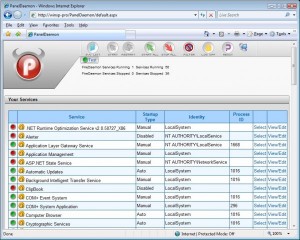
paneldeamonSo you would like an easy approach to delegate service administration for your servers, well that is easily done with PanelDaemon.

You install IIS and then PanelDaemon on your server, now you can create users/groups that can remotely manage services on your server (start, stop and restart etc)..  You can upon user/group creation decide which services a user should be able to manage and thus not necessarily give control to all services.

It’s cool, it works and it’s free 🙂  Just the way we like it..

Get it here

So I was at this seminar and was introduced to MS Windows 2008 R2 and Windows 7, and sure enough it all looked cool.  So I decided that the old P4 I had in a corner would become a new test server for the free HyperV 2008R2 server (note all the betas can be downloaded and used freely)..

And sure enough it supported 64bit, so I fired it up and began installing the HyperV 2008 R2 server (the free one without the GUI)..  It took a couple of attempts (the NIC somehow was not very co-operable) but then it was up and running.
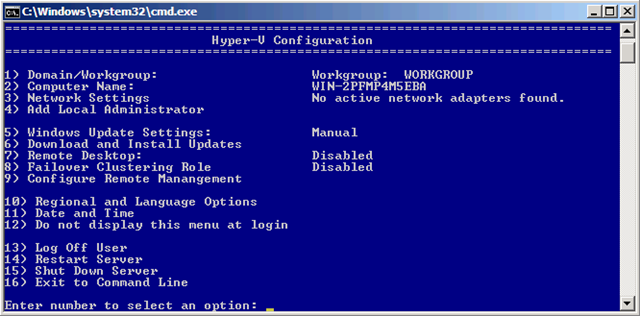
win2008menu

As you can see they have even added a nice little “Dos” menu, so you can configure the darn thing..

Well so far so good, after configuring it and installing the HyperV management tools on my Vista Workstation, I went on and configured the HyperV settings on the Win 2008 R2 server and then finally I created a new Virtual PC – a Windows 7 (yeah why not).. 

However my feeling of success was short lived, once I clicked on the “Start” button for my newly created Win7 virtual pc I got an error message telling me that the virtual pc could not be started because the HyperV service was not running..   Now there was NO error messages anywhere, so I was reluctant to believe this, but a bit of Googling let to a suspicion, and then to a visit at www.grc.com where I downloaded “securable.exe” a small freeware utility that will test your chipset.

See, just because you have a P4 that support 64bit that does not mean that it will support HyperV, hence time wasted 😐  Everyone know this!?  No!?!  Well neither did I, or rather I vaguely recall having heard something to that effect, but hey when it would install and run 64bit then I thought everything was dandy..  It’s not though, it’s just not…  The same problem is btw true for Windows 7, the new Virtual XP you can install and use on top of it, it only works if your chipset support  “Hardware Virtualization” – sigh…)…

hyperv-error3

So if you want to check out the new servers, be sure to download “securable.exe” and check for support for Vitalization before you start.  That said and warned, then the HyperV 2008R2 server looked great and fairly easy to configure, I may once it’s released from beta move my VMWare2 server to this platform instead (my current server DO support “Hardware Virtualization”, thank god for small wonders).

So lesson learned, check the specs before you begin..

BUUUUUT, it would have been nice with a Warning or a Caution from the installer “Your chipset does not support HyperV”, now how hard could that have been?   Installing the HyperV 2008 R2 server really makes no sense if you do not plan on running virtual machines (which is impossible without the Hardware vitalization)..

Well the name of this software could lead to some confusion, SpyMe?  Now why would I want to Spy myself, there is enough of a hassle with Spyware as it is..

Well this is different, this software is actually ‘your spy’ against other software.  Let’s say you are installing a new piece of software, but actually really would like to know what exactly this software does – what files it installs – what registry changes it does, etc etc etc.  Well this software will, much like the utilities used for making software packages .msi etc, create a before and after snapshot and you can thus see exactly what was done.  As I read it it also offers real time viewing of all activities..

It all sounds nice, and as its FREEWARE you’ll not be ruined 😉

I still would advocate for “Sandbox-IE” as it also offers an undo function, but still – should you just want to keep a short leach on some software installed on your pc this just might be what you are looking for.

http://www.lcibrossolutions.com/spyme_tools.htm

autorunIf you have ever had problems with autorun files in Windows (within a corporate environment) here is some good news for you. 
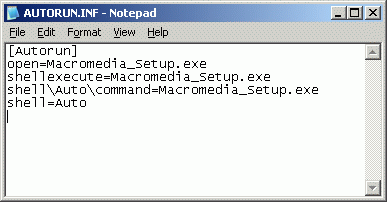
If you, in your environment set up a GPO to disable autorun.inf to combat the spread of virus/malware you were likely dissapointed, yes the setting was propogated to the pc’s but it did not stop all autorun.inf’s from executing.  The problem (among other things) had to do with complexities of autorun introduced with of USB devices (before it was only cd and disks).

Anyway, FINNALLY Microsoft has come up with a patch, lets just hope it works out 🙂  I have not had the opputunity to test it yet.

Patch should be introduced via Windows Update, for more details look here;u
http://www.microsoft.com/technet/security/advisory/967940.mspx

Update March 8th 2009, I tested the patch, and it DOES now work on network shares as well, excellent 🙂

I was patching a newly installed Win 2003 server, and the first thing I was met by was that the Windows Update web site could not be opened unless it was added as a Trusted site, however when trying to add the site http://update.microsoft.comI was met by a dialog box stating that “”There was an unexpected error with your zone settings. Unable to add site.“.  On this server Internet Explorer Enhanced security had been uninstalled.

Solution;

  • Re-install “Internet Explorer Enhanced security” from control panel, add remove programs, Windows components. 
  • Add the zones you need.
  • If you like uninstall “Internet Explorer Enhanced security” again.

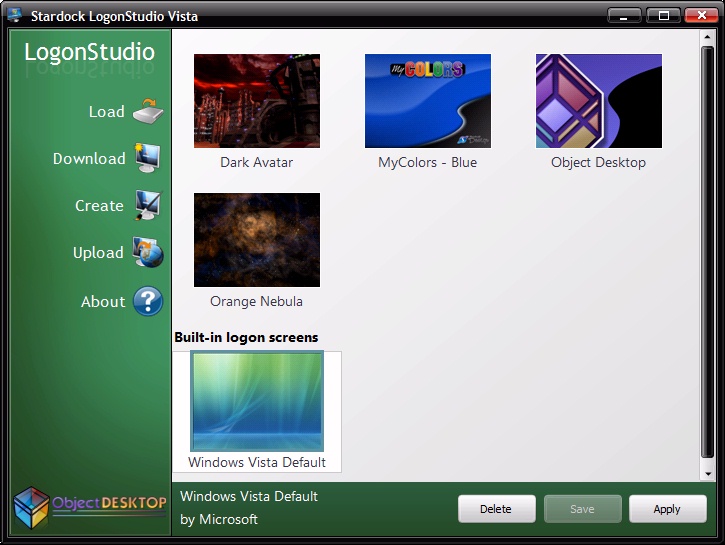
vistalogon123Are you as tired as I of the Aurora logon background every time you logon to Windows Vista, its just so darn depressing.
Well the nice people at Stardock to the rescue with “LogonStudio for Vista”, install and select your new logon background – that’s it clean and simple (is likely to work also on Windows 7).

Get it here;
http://www.download.com/LogonStudio-Vista/3000-2072_4-10696252.html

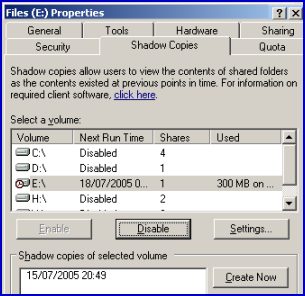
volumeshadowcopySo, I had this server where I enabled Shadow Copy on the D: volume, and I could create snapshots just fine however the scheduled shadow copy jobs never ran.  If I looked in “Control Panel”, “Scheduled Tasks” I could see that the job had never run, and if I tried to edit the schedule I got an error “0x8007000d: The data is invalid“.  I suspected the scheduler to be the culprit, but after trying whatever I could think of and google I ended up with nada..
In the end, all I had to do was to delete one single file and viola everything works.

What Microsoft claim is that I enabled Shadow Copy before running dcpromo on a memberserver, and that thus the service (Shadow Copy) would try to use an old local account (which is deleted as the server is promoted) to schedule the jobs and subsequently fail.  This in my case however was not true, however as the server was installed in Russia over our wan lines the thing might be that the server had not completed a full replication before I enabled Shadow Copy..

Anyhow, the solution can be found here;
http://support.microsoft.com/default.aspx?scid=kb;en-us;822904

And to break it down, all I needed to do was to delete the one file that was in;

%SystemDrive%\Documents and Settings\All Users\Application Data\Microsoft\Crypto\RSA\S-1-5-18

(in my case there was only one, but according to the MS site you should only delete files that begin with “d42”.

Forfiles -p c:ackup -s -m *.* -d -5 -c “cmd /c del /q @path”

This will delete all files in my backup directory older than 5 days. To test it first, use this:

Forfiles -p c:ackup -s -m *.* -d -5 -c “Cmd /C Echo 0x22@Path@File0x22”

Workarounds for XP users might be;
http://windowsitpro.com/article/articleid/71600/jsi-tip-0274—delete-files-older-than-xx-days.html (but this require additional software to be ‘installed’).

Hmm the below seem to be some unix variant, but maybe something similar is possible in Windows.

http://lifehacker.com/software/command-line/cli-fun–delete-files-older-than-x-days-239124.php (seem cool)
find /path/to/files* -mtime +5 -exec rm {} ;
http://lifehacker.com/software/geek-to-live/geek-to-live-hard-drive-janitor-133190.php (the deluxe edition)

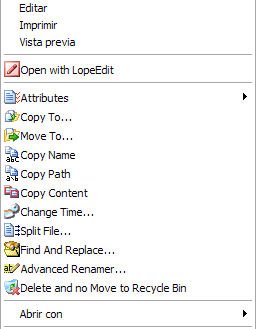
menuJust stumbled over this tool, it seem to be very practical (sure its not rocket science, but its easy and convenient) 😉

Now you can customize the context menus of Windows Explorer to add your own functionality and not only is it easy, its free as well 😀

http://www.lopesoft.com/en/index.html

.

So you for some reason or other need a custom GroupPolicy template (.adm template) to set some strange setting for some odd software.

You can use a Policy.ADM file to set custom registry values either for your own pc (may seem like a bit overkill) or more likely for your domain.

Well I have created a few of these back in the good old NT4 days and it was not all that difficult once you got the hang of it, and thus when I had the need again lately I was confident I could get it to work without too much of a hassle.

I was wrong :-/

Ok, creating a simple policy.adm file is easy;

policy1

And if you enter a keyname like;
”SoftwarePoliciesMicrosoftwhatever”

Things will work brilliantly, however lets say you want to change some obscure value for the adobe reader!?  This is outside the “Policies” section of the registry.. things will look like this when you enter the GPM MMC console.

policy2

This is where I lost my temper and started cursing at my monitor, see again once I put “Policies” in the keyname everything worked like a charm (but my setting was NOT in the Policy region of the registry)..

So Google to the rescue, it would seem that things have changed since the good old Poledit days, and that you need to do a bit of editor tweaking to get those ‘dirty’ settings available under NT4+ systems now-er-days.

Here is the secret;

policy3 
View, Filtering, “Only show policy settings that can be fully managed”..

Once this is done you can see everything – just like in the good old days 😀

policy4

Also it’s worth noting the other filter settings, I did not even know they existed, now you can actually limit your view to only those settings that are set, and this DO make it a lot easier to overlook the more complex policies.

Good luck making your new policies its easy as pie you know..

Links;
http://episteme.arstechnica.com/eve/forums/a/tpc/f/12009443/m/645000852731/inc/-1
http://www.windowsecurity.com/articles/ADM-Template-Repository.html
http://technet.microsoft.com/en-us/library/cc738443.aspx